
IBM Maximo is a powerful enterprise asset management (EAM) platform built for organizations with large, complex asset portfolios. The software brings asset maintenance management, inventory, reliability, and lifecycle data into one platform. On top, you also get access to AI-assisted monitoring and analytics designed to help teams reduce downtime, control maintenance costs, and improve asset performance.
That depth and flexibility can also make Maximo challenging to manage. User reviews frequently mention a steep learning curve, complex configuration, difficult navigation, and substantial training requirements.
Its pricing, implementation effort, and need for specialized administrative resources can be additional barriers — especially for teams that want faster deployment, more intuitive technician experience, or simpler maintenance scheduling.
In this guide, we’ll compare nine of the best IBM Maximo alternatives for 2026 across different use cases. For each, we will take a quick look at key features, what the software does well, common user complaints, and pricing models.
9 Powerful alternatives to IBM Maximo for asset and maintenance management
What is the best IBM Maximo alternative for your organization will depend on why you are searching for another solution.
Some organizations just want a different full-scale EAM platform that can manage complex assets across multiple sites. Others are looking to downsize and need a customizable CMMS for preventive and predictive maintenance. Then there are teams that need a dedicated tool for work order scheduling to address a specific Maximo limitation without requiring a complete system replacement.
For a quick overview, the table below compares each solution by product type, user rating, what it does well, and its strongest use cases. Review ratings are current as of July 2026 and may change as new reviews are published.
| Software | Solution type | User review rating | What it focuses on | Strongest industries and use cases |
|---|---|---|---|---|
| Octave Attune EAM | Enterprise asset management software | 4.3/5 on G2 | Managing complex asset lifecycles, maintenance operations, and asset performance in one platform | Manufacturing, energy, utilities, transportation, public infrastructure, and other asset-intensive operations |
| IFS Cloud EAM | EAM within a broader ERP and service management platform | 4.0/5 on G2 | Connecting asset management with enterprise resource planning, field service, and project management | Aerospace and defense, energy, utilities, construction, manufacturing, telecommunications, and complex service operations |
| Eptura Asset | Facility and asset management software | 4.1/5 on G2 | Connecting facility maintenance, physical asset tracking, inventory, inspections, and workplace operations | Corporate facilities, education, healthcare, government, real estate, and multisite workplace management |
| Fiix | Cloud-based CMMS | 4.6/5 on G2 | Making work orders, preventive maintenance, asset records, and maintenance analytics easier to manage | Manufacturing, food and beverage, transportation, warehousing, facilities, and small to enterprise maintenance teams |
| Limble | Cloud-based CMMS | 4.8/5 on G2 | Providing an intuitive, mobile-friendly maintenance experience while offering robust features | Manufacturing, facilities, hospitality, healthcare, education, property management, and multisite operations |
| eMaint CMMS | Configurable CMMS and EAM software | 4.5/5 on G2 | Adapting maintenance workflows, dashboards, reports, and asset hierarchies to complex operational requirements | Manufacturing, food and beverage, pharmaceuticals, automotive, energy, facilities, and regulated operations |
| Sockeye | Maintenance scheduling and reporting add-on for CMMS and EAM platforms | 4.1/5 on Capterra | Simplifying daily and weekly maintenance scheduling without replacing your existing CMMS or EAM | Manufacturing and facility management; maintenance teams that use Maximo or another system of record |
| MVP One | Cloud-based CMMS | 4.7/5 on G2 | Combining maintenance management, inventory, purchasing, labor scheduling, and reporting in an approachable platform | Manufacturing, food processing, automotive, facilities, education, and midsize industrial operations |
| Facilio | Connected property and facilities management platform | 4.0/5 on Capterra | Centralizing maintenance, building systems, energy, compliance, and portfolio-level property operations | Commercial real estate, retail, healthcare, corporate facilities, property portfolios, and multisite buildings |
There’s a bunch of important and useful information that doesn’t fit in a table like this, so let’s review each solution individually.
1. Octave Attune EAM (formerly HxGN EAM and Infor EAM)
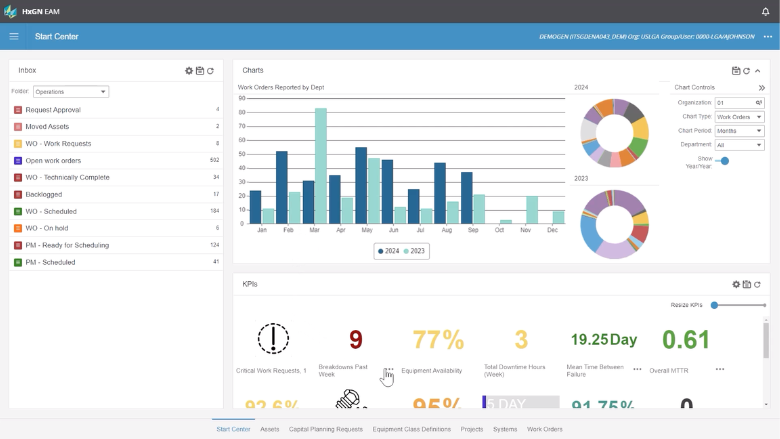
Octave Attune EAM (formerly HxGN EAM and Infor EAM) is an enterprise asset management platform built for organizations with complex, capital-intensive assets. It combines maintenance, asset lifecycle, inventory, procurement, inspections, and performance data in one system, making it one of the closest full-scale IBM Maximo alternatives on this list.
Key features:
- Asset lifecycle management: Build asset hierarchies, maintain detailed equipment records, assess criticality, and manage assets from acquisition through retirement.
- Work order management: Create, prioritize, assign, schedule, and track corrective and preventive maintenance work.
- Preventive maintenance: Set time-, usage-, or condition-based maintenance schedules to reduce failures and unplanned downtime.
- Inventory and procurement: Manage spare parts, stock levels, purchasing, suppliers, and material availability for maintenance work.
- Inspections and compliance: Create inspection routes, checklists, calibration processes, and records that support regulatory requirements.
- Mobile maintenance: Let technicians access work orders, materials, inspections, checklists, and asset information from mobile devices, including in disconnected environments.
- Asset intelligence and integrations: Connect asset and operational data with other enterprise systems while using analytics, AI, and risk calculations to support maintenance decisions.
Advantages of Octave Attune EAM:
- Comprehensive asset visibility: Users can centralize asset histories, maintenance activity, parts, costs, and performance information.
- Flexible configuration: Organizations can adapt screens, workflows, reports, and processes to different sites and operational requirements.
- Strong asset hierarchies: Reviewers value the ability to organize complex facilities and equipment into detailed parent-child structures.
- Effective maintenance tracking: Users report that maintenance schedules, work histories, and real-time tracking help them stay organized and reduce downtime.
- Relative ease of use for an enterprise EAM: Compared with some other large enterprise platforms, reviewers often find Octave Attune EAM easier to use, administer, and configure.
Common complaints about Octave Attune EAM:
- Implementation complexity: Setting up asset structures, workflows, integrations, and organizational rules can require substantial planning and specialist support.
- Configuration challenges: The platform is flexible, but adapting it to highly specific workflows can become complicated. G2’s review summaries identify setup complexity as the platform’s most frequently reported drawback.
- Data management issues: Reviewers occasionally report difficulties maintaining data quality, moving information between systems, or managing large datasets.
- Learning curve: Some users need considerable training before they can confidently use advanced features and administrative tools.
- Inconsistent user experience: Certain screens and processes may feel less intuitive than newer, mobile-first CMMS products.
Pricing model:
Octave does not publish standard pricing for Attune EAM. The platform generally uses a custom subscription model, with pricing influenced by factors such as user count, selected modules, deployment requirements, contract length, and implementation scope.
2. IFS Cloud EAM
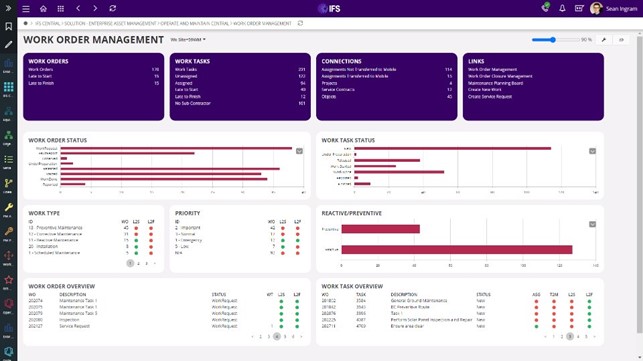
IFS Cloud EAM is an enterprise asset management solution for organizations that operate complex, high-value, or mission-critical assets. Unlike a standalone CMMS, IFS Cloud connects EAM with enterprise resource planning, supply chain management, field service management, and project management on one platform. This broad scope makes it a strong IBM Maximo alternative for organizations that want to manage assets, technicians, finances, materials, and services in a connected environment.
Key features:
- Asset lifecycle management: Manage physical assets from planning and acquisition through operation, maintenance, replacement, and disposal.
- Work order management: Create, prioritize, schedule, assign, and track preventive and corrective maintenance work across sites and asset groups.
- Preventive and predictive maintenance: Use maintenance schedules, asset conditions, operational data, and embedded AI to identify risks and reduce unplanned downtime.
- Asset performance management: Monitor asset health, costs, risks, reliability, and performance to support repair-or-replace decisions.
- Mobile workforce management: Give technicians access to work orders, asset histories, checklists, parts information, and service instructions while working in the field.
- Inventory and supply chain management: Connect maintenance requirements with spare parts, purchasing, warehouses, suppliers, and material availability.
- Planning and scheduling: Coordinate labor, tools, materials, contractors, and maintenance windows across complex operations.
Advantages of IFS Cloud EAM:
- Broad functionality: Users value the ability to manage EAM, ERP, field service, supply chain, and other business processes within one platform.
- Strong flexibility: Organizations can configure workflows, screens, roles, and business processes around industry-specific requirements.
- End-to-end visibility: The connected platform gives teams a clearer view of assets, maintenance, finances, resources, and service operations.
- Scalability: Reviewers report that IFS Cloud can support changing requirements, organizational growth, and complex multinational operations.
- Modern user experience: Many users describe IFS Cloud as relatively intuitive and accessible, but only after the platform has been configured around their processes.
Common complaints about IFS Cloud EAM:
- Complex implementation: Deploying and configuring the platform can require significant time, planning, data preparation, and experienced implementation resources.
- Extensive setup requirements: Some processes depend on data and configuration spread across several areas, making errors difficult to diagnose.
- Steep learning curve: The platform’s breadth can make training challenging, particularly for administrators and users working with advanced functions.
- Inconsistent training and support: Some reviewers report uneven training quality or slower-than-expected support responses.
- High infrastructure and resource demands: Organizations may need a substantial internal team or implementation partner to operate and optimize the platform effectively.
Pricing model:
IFS does not publish standard list prices for IFS Cloud EAM, so you must request a custom quote. In April 2026, IFS announced a shift away from conventional per-user licensing toward asset-based pricing for applicable deployments. Your final cost will also depend on the modules, deployment scope, integrations, implementation services, and support requirements you select.
3. Eptura Asset
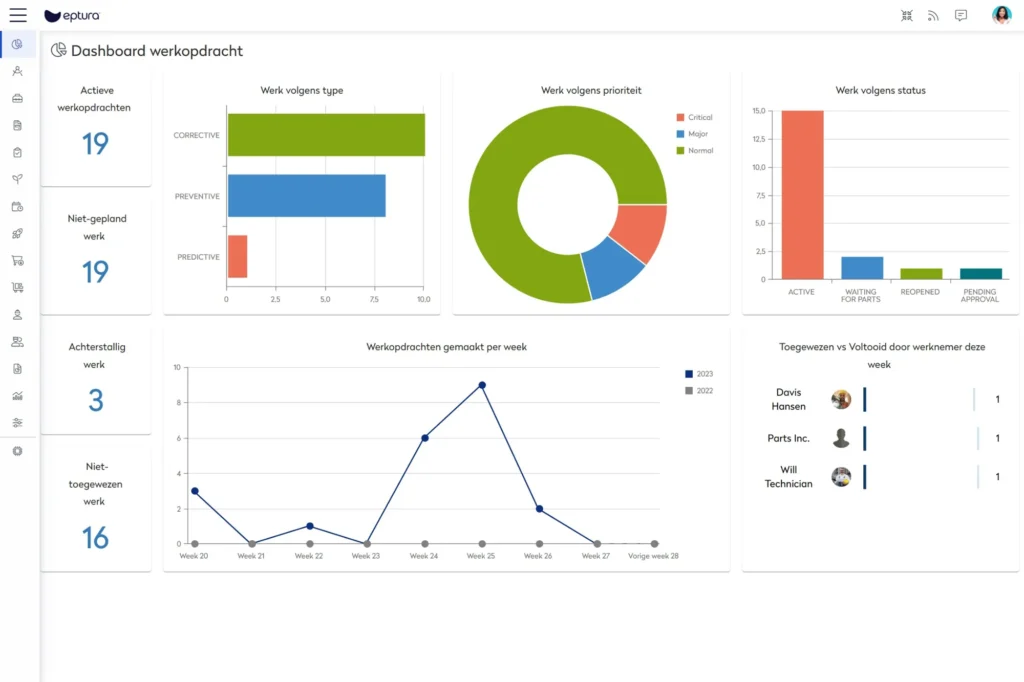
Eptura Asset is an enterprise asset management platform designed for facilities, fleet, maintenance, and field operations teams. The platform combines CMMS capabilities with broader asset lifecycle management, giving you tools for maintenance execution, inventory, purchasing, condition monitoring, and multisite governance.
Key features:
- Work order management: Create, prioritize, assign, and track maintenance requests and work orders from submission through completion.
- Preventive maintenance: Schedule recurring maintenance based on time, meter readings, or operating requirements to reduce equipment failures.
- Asset lifecycle tracking: Maintain asset records, service histories, costs, warranties, and other information throughout each asset’s useful life.
- Parts and inventory management: Track stock across multiple locations, manage vendors, and help technicians find the parts they need.
- Inspections and condition monitoring: Conduct inspections, document asset conditions, and use the results to identify maintenance requirements.
- Purchasing and vendor management: Manage purchase orders, suppliers, contractor activity, invoices, and maintenance-related spending.
- Analytics and business intelligence: Monitor asset performance, inventory, maintenance costs, work order activity, and portfolio-level trends.
Advantages of Eptura Asset:
- Centralized information: Users appreciate being able to view asset, maintenance, inventory, and operational information in one platform. Capterra reviews frequently praise the platform’s centralized information and uncomplicated workflows.
- Straightforward daily workflows: Many reviewers find basic asset records, work orders, and preventive maintenance functions relatively easy to use.
- Useful asset histories: The platform helps teams see previous repairs, recurring issues, maintenance costs, and other asset-level information.
- Accessible mobile capabilities: Technicians can review and update work orders from the field rather than relying entirely on desktop access.
Common complaints about Eptura Asset:
- Inconsistent customer support: Some reviewers report difficulty reaching support or getting technical issues resolved promptly.
- Complex setup: Initial configuration, data migration, permissions, and workflow design can require considerable effort.
- Limited mobile functionality: Some users want deeper mobile access to inventory details, asset bills of materials, and storage locations.
- Inventory and integration limitations: Reviewers occasionally report gaps in inventory depth, third-party integrations, reporting, or connections between purchasing and asset records.
Pricing model:
Eptura offers tiered plans, but it does not publish standard prices. You must contact Eptura for a custom quote based on your plan, users, modules, implementation scope, and support requirements. Eptura Asset does not currently advertise a free version or free trial.
4. Fiix
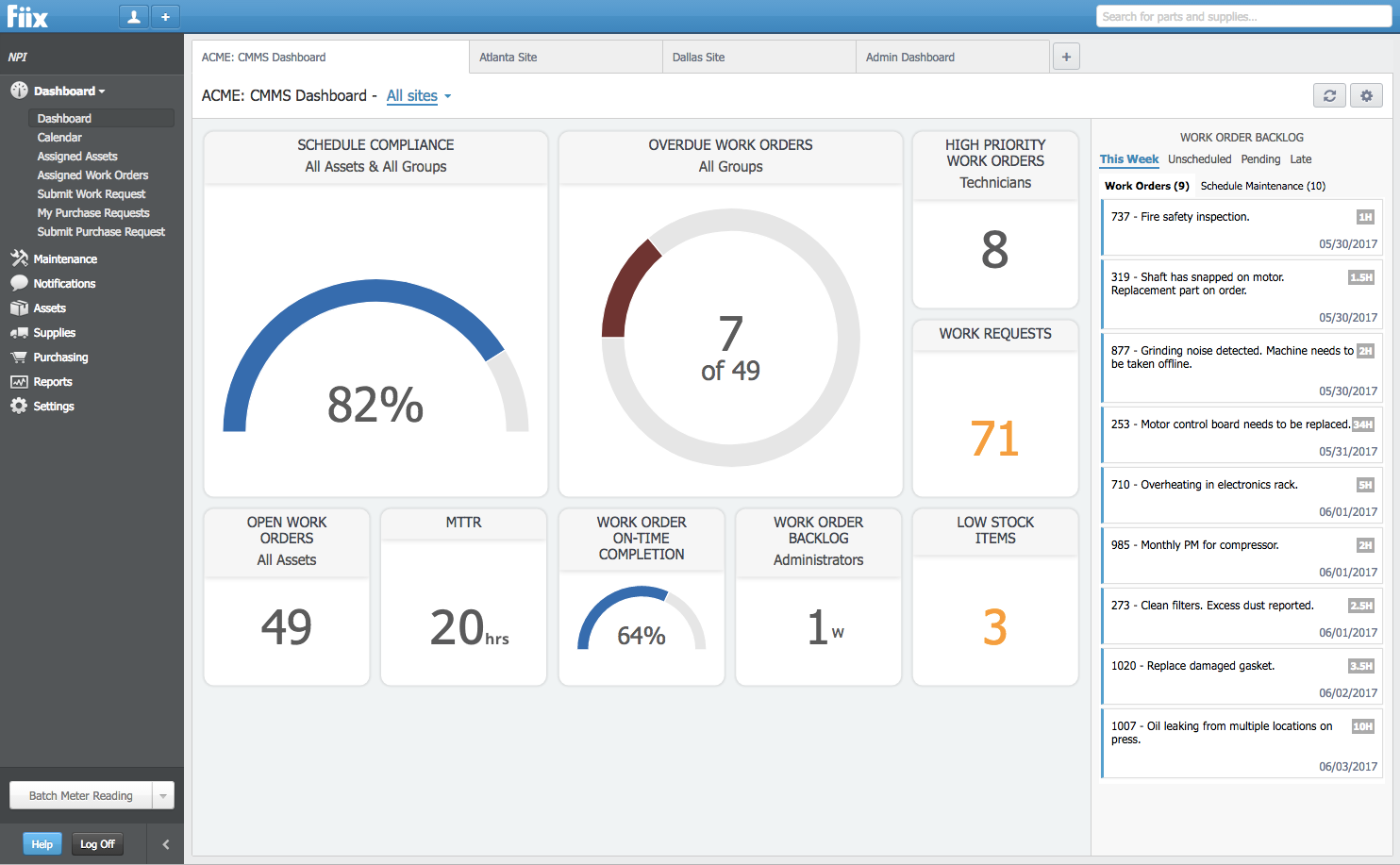
Fiix is a cloud-based CMMS from Rockwell Automation that helps maintenance teams plan, track, and optimize work across assets and facilities. It is generally easier to deploy and use than a full enterprise EAM platform, while offering in-depth asset, maintenance, and reliability management.
Key features:
- Work order management: Create, prioritize, assign, and track maintenance work from initial request through completion.
- Preventive maintenance: Automatically generate recurring work orders based on time, meter readings, or maintenance schedules.
- Asset management: Organize asset records, hierarchies, documentation, service histories, costs, and maintenance activity.
- Parts and inventory management: Track spare parts, stock quantities, suppliers, purchasing activity, and parts used on work orders.
- Mobile maintenance: Give technicians access to work orders, asset information, checklists, notes, and photos from mobile devices.
- Reporting and dashboards: Monitor downtime, maintenance costs, work order completion, preventive maintenance compliance, and other maintenance KPIs.
- AI and integrations: Use Fiix Foresight tools and integrations to analyze maintenance data, connect business systems, and identify opportunities to improve asset reliability.
Advantages of Fiix:
- Easy-to-use interface: Reviewers frequently describe Fiix as intuitive and relatively straightforward to learn, including for technicians with limited CMMS experience.
- Strong work order management: Users value the ability to create, organize, assign, and complete work orders while retaining a detailed maintenance history.
- Effective preventive maintenance: Automated maintenance schedules help teams move away from reactive work and reduce missed preventive tasks.
- Centralized maintenance records: Fiix brings asset histories, labor, parts, documents, and maintenance activity into one accessible platform.
- Helpful customer support: Many reviewers praise Fiix’s onboarding resources, training materials, and support team.
Common complaints about Fiix:
- Difficult report customization: Some reviewers find it challenging to create or modify reports beyond the standard templates.
- Mobile app limitations: Some functions available on the desktop platform may be harder to access or less complete on mobile devices.
- Advanced features cost more: Integrations, AI capabilities, workflow controls, and other advanced functions will require a higher-priced plan.
- Configuration takes time: Asset hierarchies, preventive maintenance schedules, permissions, and data fields must be set up carefully to get the most value from the platform.
Pricing model:
Fiix uses a per-user subscription model with monthly and annual billing options. It’s Free plan supports basic maintenance needs, while the Basic plan starts at $45 per user per month. Enterprise pricing is customized, and your total cost may increase if you need advanced integrations, AI tools, implementation assistance, or additional services.
5. Limble
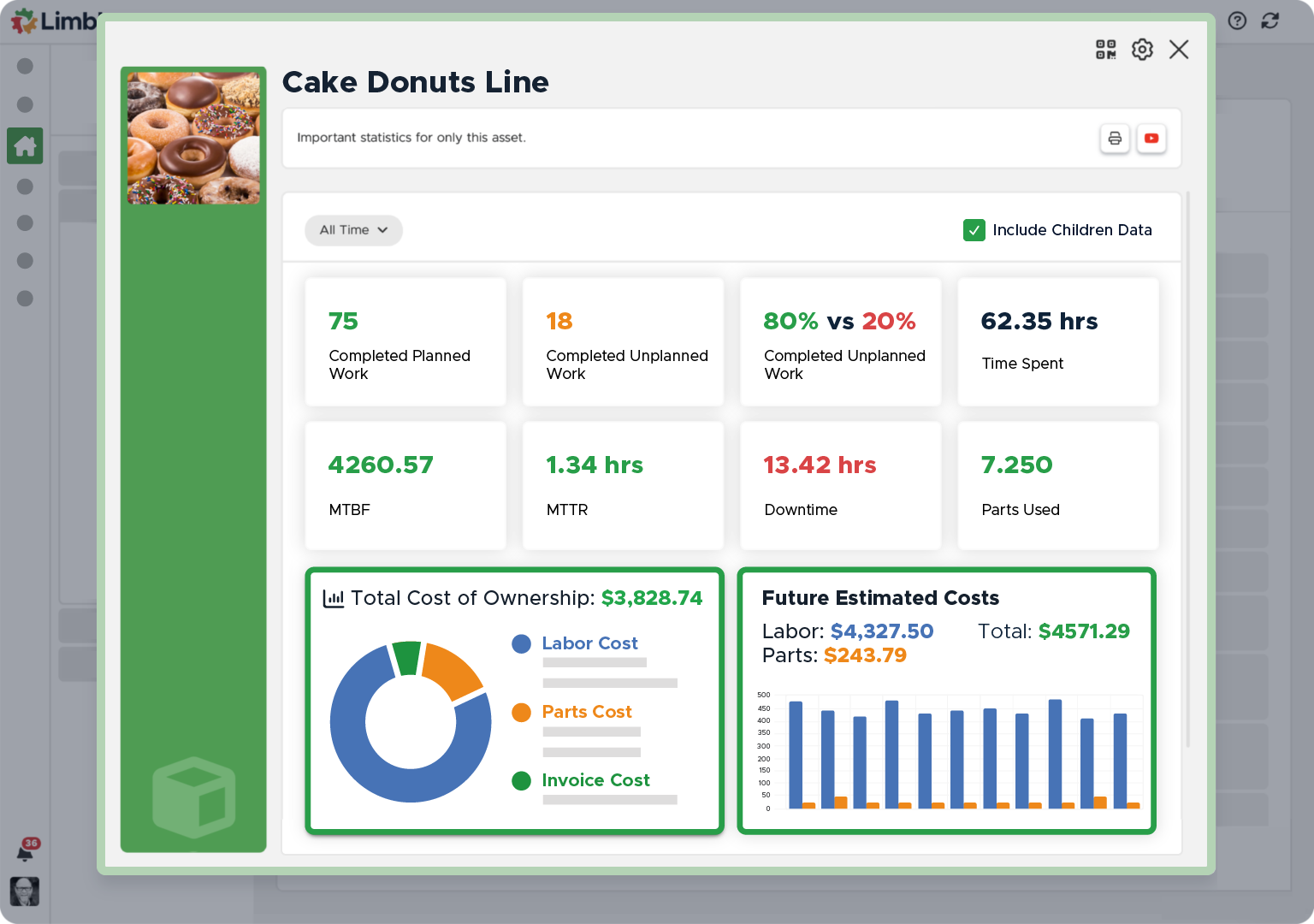
Limble is a mobile-first CMMS designed to streamline and centralize maintenance management for technicians, supervisors, and operations teams. It’s a strong IBM Maximo alternative for organizations that want faster implementation and a simpler user experience while still having access to robust asset management functionality.
Key features:
- Work order management: Create, assign, prioritize, and track maintenance tasks, procedures, labor, and costs.
- Preventive maintenance: Generate recurring work orders based on time, meter readings, or operating thresholds.
- Asset management: Maintain asset hierarchies, service histories, warranties, bills of materials, and downtime metrics such as MTBF and MTTR.
- Mobile maintenance: Let technicians access work orders, asset information, photos, and procedures from mobile devices, with offline access available on higher-tier plans.
- Work request portal: Allow employees and other requesters to submit maintenance issues through QR codes or a dedicated request portal.
- Parts and inventory management: Track spare parts, stock thresholds, vendors, purchase orders, and parts used during maintenance work.
- Reporting and dashboards: Build custom dashboards and monitor preventive maintenance completion, downtime, costs, and other maintenance KPIs.
Advantages of Limble:
- Intuitive interface: Reviewers frequently describe Limble as easy to navigate and straightforward for technicians to learn, with an excellent mobile app.
- Strong preventive maintenance tools: Users value the ability to automate schedules, reminders, procedures, and maintenance documentation.
- Responsive customer support: Many reviewers praise Limble’s onboarding, training resources, and support team.
- Relatively simple implementation: Users often report that initial setup and adoption are easier than with more complex CMMS and EAM platforms.
- Useful customization: Teams can adapt work orders, procedures, dashboards, asset fields, and workflows to their maintenance processes.
Common complaints about Limble:
- Limited reporting flexibility: Some users want more control over custom dashboards, graphs, and reports that combine multiple data points.
- Bulk updates can be cumbersome: Reviewers report that updating large numbers of assets, preventive maintenance schedules, or technician assignments can take extra time.
- Offline mode can be inconsistent: Some users experience reliability or synchronization issues when using the mobile app without connectivity.
Pricing model:
Limble uses a tiered, per-user subscription model. Enterprise pricing is customized and includes advanced multisite controls, integrations, approval workflows, and compliance features.
6. eMaint CMMS
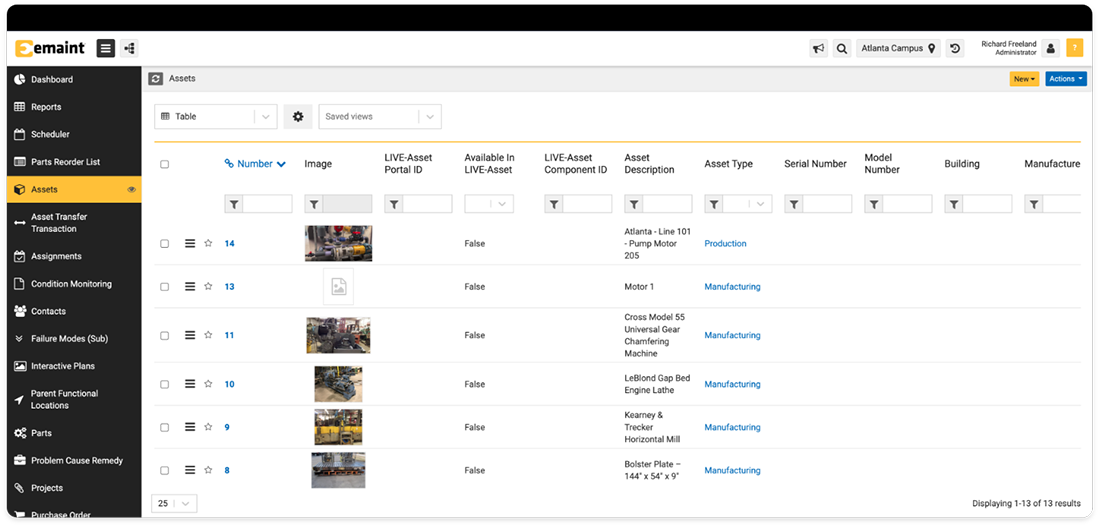
eMaint CMMS is an enterprise CMMS from Fluke Reliability. It combines CMMS, EAM, and connected reliability capabilities, making it suitable for organizations that need in-depth configurability and asset management. eMaint is particularly strong for industrial teams that want to connect work management with condition-monitoring data and broader reliability programs.
Key features:
- Work order management: Create, prioritize, assign, approve, and track corrective and preventive maintenance work.
- Preventive maintenance: Schedule recurring tasks based on dates, meter readings, asset conditions, or operational triggers.
- Asset management: Build asset hierarchies and maintain equipment histories, documents, costs, warranties, and reliability data.
- Parts and inventory management: Track stock levels, parts usage, suppliers, purchase orders, and reorder points across multiple locations.
- Mobile maintenance: Let technicians receive work orders, document completed work, review asset information, and enter data from the field.
- Reporting and dashboards: Configure reports, dashboards, KPIs, and data views around your organization’s maintenance and reliability priorities.
- Condition monitoring and integrations: Connect eMaint with sensors, Fluke tools, ERP platforms, and other enterprise systems to support condition-based and predictive maintenance.
Advantages of eMaint CMMS:
- Highly configurable workflows: Reviewers value the ability to customize fields, forms, dashboards, reports, and maintenance processes around specific operational requirements.
- Strong preventive and condition-monitoring tools: Users can build detailed preventive maintenance programs and standardize maintenance procedures across assets and sites. Fluke’s ecosystem simplifies implementation of condition-based maintenance.
- Responsive customer support: Many reviewers praise the implementation, training, and ongoing assistance provided by the eMaint team.
- Effective multisite management: Organizations can standardize processes while retaining visibility into maintenance activity across several plants or facilities.
Common complaints about eMaint CMMS:
- Reporting can be complicated: Some reviewers find report configuration difficult and need additional training to create the views they want.
- Steep learning curve: eMaint’s extensive configuration options can make setup and advanced administration challenging for new users.
- Interface can feel dated or clunky: Both desktop and mobile experiences are less polished compared to newer CMMS platforms.
- Occasional performance issues: Reviewers report slow loading, bugs, and inconsistent behavior in certain dashboards and workflows.
- Some capabilities require workarounds: Users occasionally identify missing features or processes that require additional configuration, exports, or manual steps.
Pricing model:
eMaint uses a tiered, per-user subscription model. Enterprise pricing is customized based on factors such as user count, sites, functionality, integrations, and implementation requirements.
7. Sockeye
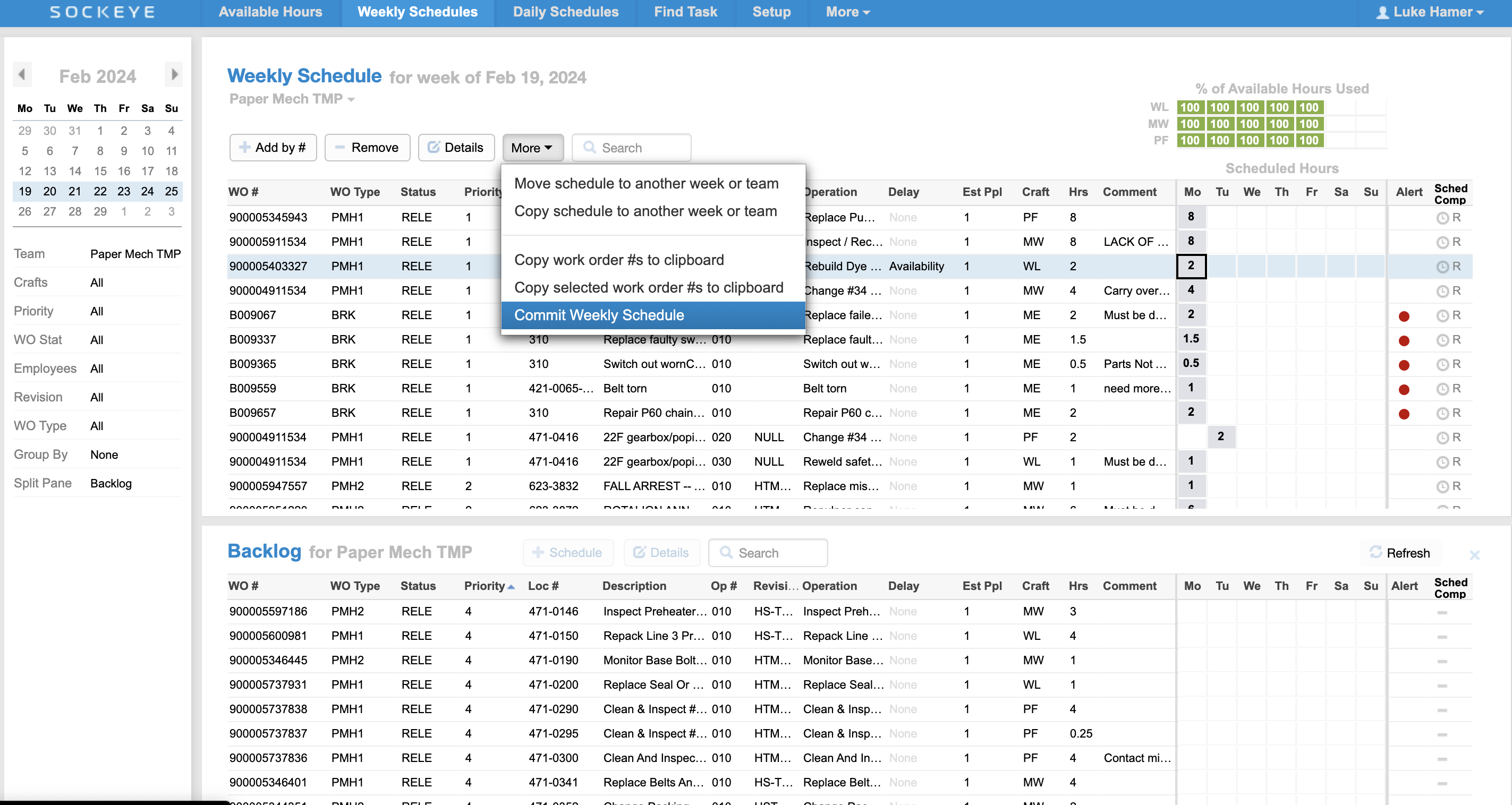
Sockeye is a maintenance scheduling and reporting add-on that connects with Maximo and other CMMS and EAM software. Unlike the full Maximo replacements on this list, Sockeye allows you to keep Maximo as your system of record while providing planners and schedulers with a simpler way to assign work, balance labor, publish schedules, and track maintenance KPIs. In that sense, Sockeye is a complementary solution that sits on top of Maximo.
Key features:
- Automated work order scheduling: Match ready-to-schedule work orders with available technicians and contractors to create daily or weekly schedules.
- Maximo integration: Use a bidirectional API connection to synchronize work orders, assignments, labor availability, and schedule changes between Sockeye and Maximo.
- Drag-and-drop rescheduling: Need to make changes to the schedule? Assign tasks to a different team with a couple of clicks — or simply drag and drop work to the next available slot.
- Labor availability dashboard: View labor availability for all crews and contractors inside a single dashboard. Make changes (sick days, training…) with a couple of clicks.
- Workload leveling: Track labor utilization % for different teams and individuals in real-time as you (re)schedule work. Use it to consistently create balanced schedules and level workload between shifts and teams.
- Visual schedule management: Search, filter, assign, and update work through an accessible visual schedule that can be shared across maintenance and operations teams.
- Track key scheduling metrics: Get automated, pre-built reports on scheduling metrics based on SMRP standards. Easily build custom KPI dashboards. Send all data to your business intelligence software.
Advantages of Sockeye:
- No need to replace the existing system: A perfect solution for teams that struggle with maintenance scheduling but do not want to go through a long and expensive process to replace their current system of record.
- Super simple scheduling experience: On average, schedulers only need a single hour of training before they can start actively using Sockeye to build and maintain weekly schedules.
- Fast & customizable setup: Depending on the type of integration (file-based vs API-based), Sockeye can be up and running in under two weeks. During setup, you can tell which WO data points from your CMMS/EAM you want to see in your dashboard, and the Sockeye team will configure everything for you.
- Less manual schedule building: Users report saving up to 90% of admin time spent on scheduling by reducing spreadsheet work, manual coding, and repeated data entry.
Common complaints about Sockeye:
- Occasional synchronization issues: In some cases, users have to manually click on a button to force synchronization between Sockeye and their maintenance software.
- Edge cases can create bugs: Reviewers have reported setup issues with complicated work orders involving multiple assets, equipment records, or assigned employees.
- Limited features: Sockeye is purpose-built for work order scheduling, so some users are disappointed that it does not cover broader maintenance management functionality.
Case study:
AV Group was spending enormous amounts of time building simple reports, and those reports still missed key insights, such as how much PM was completed or what work was missed each week. Sockeye synced directly with their existing Maximo solution to automate data entry, simplify scheduling with drag-and-drop functionality, and allow precise labor availability tracking to adjust schedules before overtime becomes an issue. Read the full case study.
“Sockeye identifies where deficiencies are in your man hours, so you can level between crews. For instance, if Crew A is 40 hours over schedule, but Crew B is only 35% scheduled, you can move your resources to level it out to avoid overtime pay. That saves you money.”
Todd Hicks, Planning and Shutdown Superintendent AT THE AV GROUP
Pricing model:
Sockeye uses a custom month-to-month subscription model rather than publishing fixed pricing tiers. Pricing depends on the integration type, number of locations, and number of active users. The subscription includes hosting, training, support, and product updates, and Sockeye offers a free trial using a file-based integration.
8. MVP One
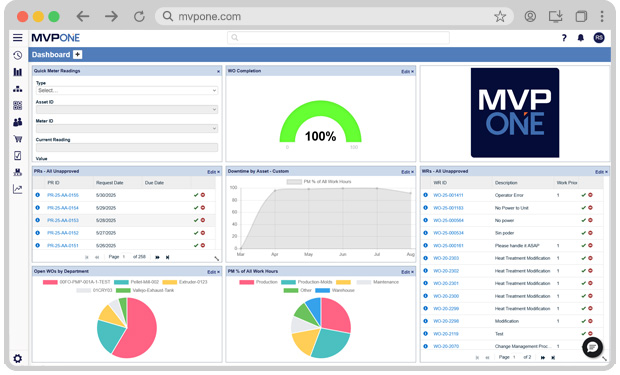
MVP One is a cloud-based CMMS designed for asset-intensive organizations that want to centralize maintenance, equipment, inventory, purchasing, and labor information. The platform combines core maintenance management with configurable workflows and multisite capabilities.
Key features:
- Work order management: Create, prioritize, assign, and track corrective, preventive, and emergency maintenance work.
- Preventive maintenance: Automate recurring maintenance based on schedules, meter readings, and operating requirements.
- Asset management: Store equipment records, maintenance histories, documents, labor costs, parts costs, and other lifecycle information.
- Inventory management: Track spare parts, tools, vendors, stock levels, storeroom locations, and usage to reduce parts-related delays.
- Purchasing management: Create purchase requests and orders, manage suppliers, and connect maintenance demand with procurement activity.
- Mobile maintenance: Let technicians access and update work orders, asset records, labor, and parts data from Android and iOS devices, including while offline.
- Reporting and integrations: Build reports and KPI dashboards, schedule report distribution, and connect MVP One with ERP, business intelligence, and workflow platforms.
Advantages of MVP One:
- Straightforward daily workflows: Many users describe the platform as organized and relatively easy to use for routine maintenance activities.
- Strong customer support: Reviewers frequently praise MVP One’s account management, training, and support teams.
- Broad feature set: Users appreciate the range of maintenance, asset, inventory, purchasing, reporting, and mobile capabilities available within the platform.
- Useful cost tracking: The software helps teams track labor and parts expenses against individual assets, giving managers better visibility into lifecycle costs.
Common complaints about MVP One:
- Takes time to learn: Some users find that the platform’s extensive functionality requires substantial training before teams can use it effectively.
- Interface can feel dated: Certain screens and workflows may appear less polished or intuitive than those in newer, mobile-first CMMS products.
- Reporting can take time to configure: Users may need training or administrative support to build more complex reports and dashboards.
- Integrations may require extra work: Connections with third-party systems can require middleware, custom configuration, or assistance from MVP One’s team.
Pricing model:
MVP One uses a tiered, per-named-user subscription model. Elite and Enterprise plans use custom pricing for more advanced or multisite requirements. MVP One also offers a free trial but does not advertise a permanent free plan.
9. Facilio
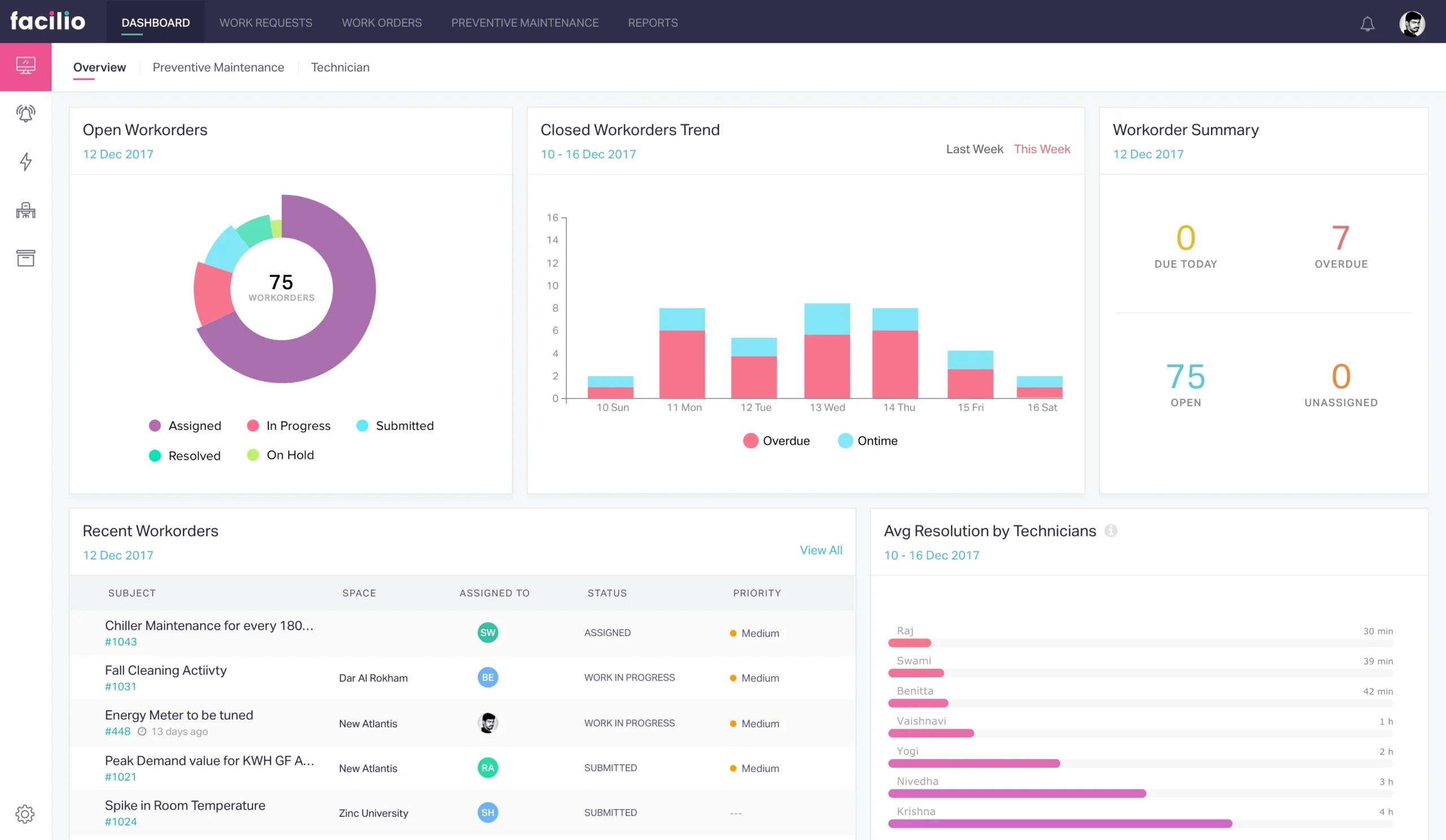
Facilio is a cloud-based CMMS and facilities management platform built primarily for property owners, operators, and facility management service providers. It brings maintenance, asset data, vendors, occupants, compliance, energy, and building systems into one platform. Facilio is a strong Maximo alternative for organizations that manage large, multisite property portfolios and want deeper connections between maintenance and overall building operations.
Key features
- Work order management: Create, route, prioritize, assign, and monitor maintenance requests across internal teams and external service providers.
- Preventive maintenance: Schedule recurring work based on time, asset conditions, inspections, or compliance requirements.
- Asset lifecycle management: Track asset locations, conditions, warranties, service histories, costs, and replacement requirements in a centralized asset database.
- Mobile maintenance: Give field teams mobile access to work orders, asset profiles, manuals, inspections, photos, and service records, including offline functionality.
- Vendor and contractor management: Manage service providers, requests for quotation, contracts, performance, invoices, and service-level agreements.
- IoT and building system integration: Connect operational data from building management systems, sensors, meters, and other property technologies to automate maintenance responses.
- Portfolio analytics and reporting: Monitor maintenance spending, asset performance, open work orders, team productivity, compliance, and other KPIs across sites.
Advantages of Facilio:
- Intuitive interface: Reviewers often describe the platform as accessible and relatively easy to navigate compared with older facilities management systems.
- Strong multisite management: Facilio gives property teams a consolidated view of maintenance activity and vendor performance across large portfolios.
- Flexible workflow automation: Organizations can configure approval processes, service routing, alerts, inspections, and other workflows around their operating model.
- Responsive customer support: Customer service is one of Facilio’s stronger review categories, and reviewers often praise the vendor’s implementation and support teams.
Common complaints about Facilio:
- Mobile experience limitations: Capterra reviewers give Facilio’s mobile access lower scores than many of its core maintenance features, suggesting that some field workflows may be less complete or intuitive.
- Complex initial configuration: Connecting building systems, importing asset data, and configuring portfolio-wide workflows can require considerable planning and implementation support.
- Some functionality may need customization: Organizations with specialized operational processes may need additional configuration or integrations to match their requirements.
Pricing model:
Facilio uses a custom, named-user subscription model with Standard, Essential, and Enterprise tiers. Admin, maintenance, and portal users may have different license rates, with volume discounts available for larger deployments. Facilio also charges a separate implementation fee, while third-party integrations may involve development and recurring maintenance fees.
Choosing the right Maximo alternative based on your use case
While we understand that numerous constraints and requirements will guide your decision, here are some broad strokes recommendations to point you in the right direction:
- Replacing Maximo with another enterprise EAM platform → Choose Octave Attune EAM or IFS Cloud EAM. Both platforms support complex asset hierarchies, multisite operations, maintenance planning, inventory, procurement, and asset lifecycle management. IFS Cloud is especially relevant when you also want to connect EAM with ERP, field service, supply chain, and project management.
- Improving maintenance scheduling without replacing Maximo → Choose Sockeye. Sockeye integrates with Maximo and gives planners/schedulers a simpler way to assign work, balance labor capacity, publish schedules, and monitor schedule compliance while keeping Maximo as the system of record.
- Moving to a simpler CMMS while prioritizing technician adoption and ease of use→ Choose Limble or Fiix. Both platforms provide intuitive work orders, preventive & predictive maintenance, asset, inventory, and mobile tools without the breadth or administrative complexity of a full enterprise EAM system.
- Supporting condition-based and predictive maintenance → Choose eMaint CMMS, Fiix, or IFS Cloud EAM. eMaint integrates with Fluke Reliability tools and condition-monitoring data; FiiX is the best solution for those in the Rockwell Automation ecosystem; IFS Cloud supports asset performance management, operational data, and AI-assisted maintenance strategies.
- Managing facilities and workplace assets → Choose Eptura Asset or Facilio. Eptura Asset is well suited to facilities teams that need maintenance, inventory, inspections, and asset lifecycle tracking. Facilio is a stronger fit when you also need to connect maintenance with building systems, vendors, energy, compliance, and portfolio-level property operations.
- Managing maintenance across multiple plants or facilities → Choose eMaint CMMS, Limble, or MVP One. All three platforms support multisite maintenance operations. eMaint provides deeper configuration, Limble emphasizes usability, and MVP One offers a great balance of maintenance, inventory, purchasing, and reporting capabilities.
- Standardizing maintenance across regulated operations → Choose eMaint CMMS, Octave Attune EAM, or IFS Cloud EAM. Their configurable workflows, inspection records, asset histories, and reporting capabilities can support auditability and consistent maintenance processes.
- Want enterprise capabilities in a more approachable system → Choose MVP One or eMaint CMMS. MVP One provides broad maintenance and materials-management capabilities, while eMaint offers greater configuration and reliability-management depth.
Do you need to replace IBM Maximo, or supplement it with another tool?
Replacing IBM Maximo is a major operational decision. A full transition can involve data migration, process redesign, system integrations, user training, testing, and change management across multiple teams and locations.
The cost is not limited to software licensing. You also need to account for implementation services, internal project time, temporary productivity losses, and the risk of disrupting maintenance operations during the changeover.
Before choosing a replacement, identify the specific problem you are trying to solve. Maximo may still be the right system of record if your biggest challenges involve maintenance scheduling, planner usability, and labor workload visibility rather than core asset management.
In that case, a complementary solution such as Sockeye may provide an enormously cheaper and less disruptive path.
That said, there will be situations where you simply need an alternative as Maximo no longer fits your organization’s broader requirements — whether the problems are related to cost, mobile usability, administrative overhead, or something else.
Whichever solutions you replace it with, remember that Sockeye is here — ready to fix your maintenance scheduling workflows.
Frequently asked questions
A Maximo migration can take several weeks to more than a year, depending on your data volume, number of sites, customizations, integrations, and chosen replacement. A midsize CMMS migration may take around 6–12 weeks, while a complex enterprise EAM rollout can take several months or longer. Build time into your plan for data cleansing, mapping, testing, user training, and a phased cutover.
Start by identifying whether your problem is with Maximo’s core capabilities or a specific process such as scheduling, reporting, or technician usability. You should also compare migration requirements, integrations, asset hierarchies, mobile functionality, security, scalability, user adoption, implementation support, and total cost of ownership. When Maximo still works well as your system of record, supplementing it with a focused tool may be less disruptive than replacing it.
Octave Attune EAM and IFS Cloud EAM are great alternatives, with honorable mention for SAP EAM and JDE. That said, there are many other good EAM solutions out there that might be a better fit for a specific industry they specialize in.
Platforms like Limble, MaintainX, Fiix, and MVP One are strong Maximo alternatives for midsize teams. Limble and MaintainX prioritize ease of use and mobile adoption, Fiix provides strong maintenance analytics and asset histories, and MVP One combines maintenance with inventory and purchasing. These focused CMMS platforms can provide the core functionality midsize teams need without the cost and administrative complexity of a full enterprise EAM system.
The best option depends on the operational gap you need to address. DCIM platforms such as Schneider Electric EcoStruxure IT, Sunbird DCIM, Nlyte, and Device42 are better suited to power, cooling, space, capacity, environmental monitoring, and IT infrastructure visibility. CMMS and EAM platforms such as eMaint, Fiix, IFS Cloud, and SAP Asset Management are more appropriate for work orders, preventive maintenance, spare parts, compliance records, and asset lifecycle management. DCIM and maintenance software often serve different purposes, so a data center may need both rather than a single Maximo replacement.
When Maximo already meets your asset-management needs but maintenance planning remains difficult, a specialized scheduling layer may be more practical than replacing the entire platform. For example, Sockeye’s data center maintenance scheduling software integrates with an existing CMMS or EAM to manage work orders, labor capacity, contractors, maintenance windows, and scheduling KPIs.
