
Maintenance scheduling for utilities is challenging, even among asset-intensive industries. Teams have to coordinate work across geographically dispersed assets while accounting for limited labor, specialized skills, operating constraints, regulatory requirements, and emergency work.
A schedule that looks realistic on paper can quickly fall apart when a crew is redirected to an outage, an asset cannot be taken offline, or required parts are not available. Effective utility maintenance scheduling therefore requires a clear view of priorities, resources, asset conditions, and operational constraints.
This guide looks at the most common scheduling challenges in this industry, the tools that can help address them, how priorities differ across utility sectors, and practical scheduling practices that apply to most utility maintenance teams.
Common utility maintenance scheduling challenges and constraints
Planners and schedulers working for energy and utility companies have to deal with all sorts of challenges:
- Geographically dispersed assets: Utilities may maintain substations, pumping stations, pipelines, treatment facilities, transmission infrastructure, and other assets across large service areas. Travel time reduces available wrench time and can influence how jobs should be grouped and assigned.
- Emergency and break-in work: Emergencies like outages, leaks, and storms can pull crews away from planned work with little warning. Schedulers need a process for rescheduling displaced work so it does not simply disappear back into the backlog.
- Limited labor and specialized skills: Many jobs require specific certifications, trades, contractors, or multi-person crews. PTO, shift schedules, overtime limits, and contractor availability further reduce usable labor capacity.
- Operational constraints: Some assets can only be maintained during planned outages, low-demand periods, or when sufficient redundancy is available. A fully planned job may therefore remain unscheduled until operations can provide a suitable maintenance window.
- Competing priorities: Utilities often have more ready work than they can complete in a given week. Schedulers have to balance reliability-critical work, regulatory requirements, preventive maintenance, corrective work, and lower-risk backlog instead of relying on due dates alone.
- Parts, equipment, permits, and access: Work may depend on replacement parts, specialized vehicles, lifting equipment, permits, isolation procedures, or site access. Scheduling a job before these prerequisites are ready increases the risk of delays and wasted crew time.
- Fragmented maintenance data: Information needed to build the schedule may be spread across CMMS/EAM, GIS, SCADA, ERP, condition monitoring systems, spreadsheets, and field service applications. Without a consolidated view, planners and schedulers may struggle to assess work demand, asset condition, and resource availability.
- Compliance and documentation requirements: Certain inspections and maintenance activities must be completed within defined regulatory intervals. Schedules therefore have to account for compliance deadlines alongside reliability and operational priorities, while ensuring completed work is properly documented for audits and reporting.
These constraints help explain why utilities often rely on several interconnected systems rather than a single work order scheduling application.
Tools that support utility maintenance scheduling
The information needed to build a realistic utility maintenance schedule can come from maintenance, operations, asset condition, workforce, inventory, and geographic systems.
A CMMS or EAM will usually remain the system of record for maintenance work, but companies may use additional tools to improve specific parts of the process. For example, scheduling software can automate parts of the scheduling process, GIS can provide asset location data, and SCADA or condition monitoring systems can help determine when maintenance should be performed.
The table below shows where the most common systems fit into the scheduling process.
| Tool | Role in utility maintenance scheduling | How it helps | Examples |
|---|---|---|---|
| CMMS | Manages maintenance work, assets, PMs, and the backlog | Generates and tracks work orders, maintains asset history, schedules recurring maintenance, and provides the pool of work that planners and schedulers need to manage | Limble, Fiix, UpKeep, MaintainX, eMaint |
| EAM | Provides broader enterprise asset and work management | Combines maintenance work with asset lifecycle information, labor, materials, procurement, reliability, and other enterprise processes | IBM Maximo, SAP S/4HANA Asset Management, IFS Cloud EAM, Oracle Utilities Work and Asset Management |
| Maintenance scheduling bolt-on | Creates executable weekly and daily schedules from existing maintenance data | Gives schedulers a more focused way to match ready work with available labor, balance capacity, assign technicians, and adjust schedules when conditions change | Sockeye |
| Field service management (FSM) | Coordinates mobile crews and day-of-work execution | Helps utilities assign and dispatch field technicians, optimize routes, respond to urgent work, and update assignments as conditions change | Oracle Field Service, Salesforce Field Service, Praxedo |
| GIS | Provides geographic and network context for utility assets | Shows where work is located, supports geographic job grouping, and helps utilities understand network relationships, service territories, and access requirements | Esri ArcGIS Utility Network, GE Vernova Smallworld |
| SCADA | Provides real-time operational and process data | Can expose equipment status, runtime, alarms, starts, loads, and other operating conditions that affect when maintenance should be performed | AVEVA System Platform, Siemens SIMATIC, Rockwell Automation FactoryTalk |
| IoT / APM | Monitors asset condition, performance, and failure risk | Helps utilities prioritize maintenance using condition and predictive information instead of relying only on fixed calendar intervals | GE Vernova APM, AVEVA Asset Performance Management |
| ERP / inventory systems | Manages parts, purchasing, contractors, and other supporting resources | Helps planners confirm that required materials and external resources are available before committing work to the schedule | SAP, Oracle, Microsoft Dynamics 365 |
Utilities often use several of these systems together because each one solves a different part of the scheduling problem.
A workflow might look like this:
SCADA or APM identifies a maintenance need → CMMS/EAM creates and manages the work order → scheduling software assigns the work to available labor → FSM supports dispatch and field execution
For example, a pump may exceed a runtime threshold in SCADA, triggering a maintenance task in the EAM software. Once the job has been planned and materials are available, a scheduling tool can place it into the weekly schedule based on crew capacity and required skills. Field service software can then handle the technician’s daily route, mobile work instructions, and completion updates.
Avoid duplicating functionality unnecessarily
Many modern CMMS and EAM platforms already include functionality that overlaps with field service, mobile, inventory, GIS, or asset performance tools. Adding another application only makes sense when it solves a specific limitation in the existing process.
Before introducing a new system, consider:
- What does the current CMMS/EAM already handle well? A platform may already provide sufficient PM scheduling, mobile work management, inventory, or basic labor assignment.
- Where does the current workflow break down? For example, planners may struggle with capacity leveling, labor availability, large weekly schedules, or frequent rescheduling even though the underlying EAM manages work orders well.
- Does the problem require replacing the core system? In many cases, a specialized bolt-on can improve one weak part of the workflow without forcing the utility to replace a mature CMMS/EAM implementation.
- Will another tool reduce or create complexity? Every additional platform introduces integration, training, administration, and data-governance requirements.
A dedicated scheduling bolt-on like Sockeye helps address a narrow problem. It connects to systems such as SAP, IBM Maximo, JD Edwards, and Infor, pulls in ready-to-schedule work and labor information, and provides a more focused interface for building and adjusting maintenance schedules without replacing the underlying CMMS or EAM.
Integrations matter as much as individual features
The value of each tool depends partly on how well it can exchange data with the rest of your technology stack. Useful integrations might connect:
- CMMS/EAM and GIS: Keep asset records, locations, and maintenance work aligned.
- CMMS/EAM and SCADA: Use runtime, meter readings, alarms, and operating conditions to trigger or prioritize maintenance.
- CMMS/EAM and APM/IoT: Turn condition monitoring and predictive insights into actionable maintenance work.
- CMMS/EAM and scheduling software: Share work orders, labor availability, skills, priorities, and schedule updates.
- CMMS/EAM and ERP/inventory systems: Confirm parts, purchasing, contractor, and resource information before work is executed.
Without these connections, planners, schedulers, and field teams may have to reconcile information manually across spreadsheets and disconnected applications. That increases duplicate data entry and makes it harder to maintain an accurate view of asset condition, work status, available resources, and operational constraints.
Maintenance scheduling priorities vary by utility sector
Most utilities face the same core scheduling challenges. However, the factors that determine when work can be performed and which work takes priority vary considerably by utility sector.
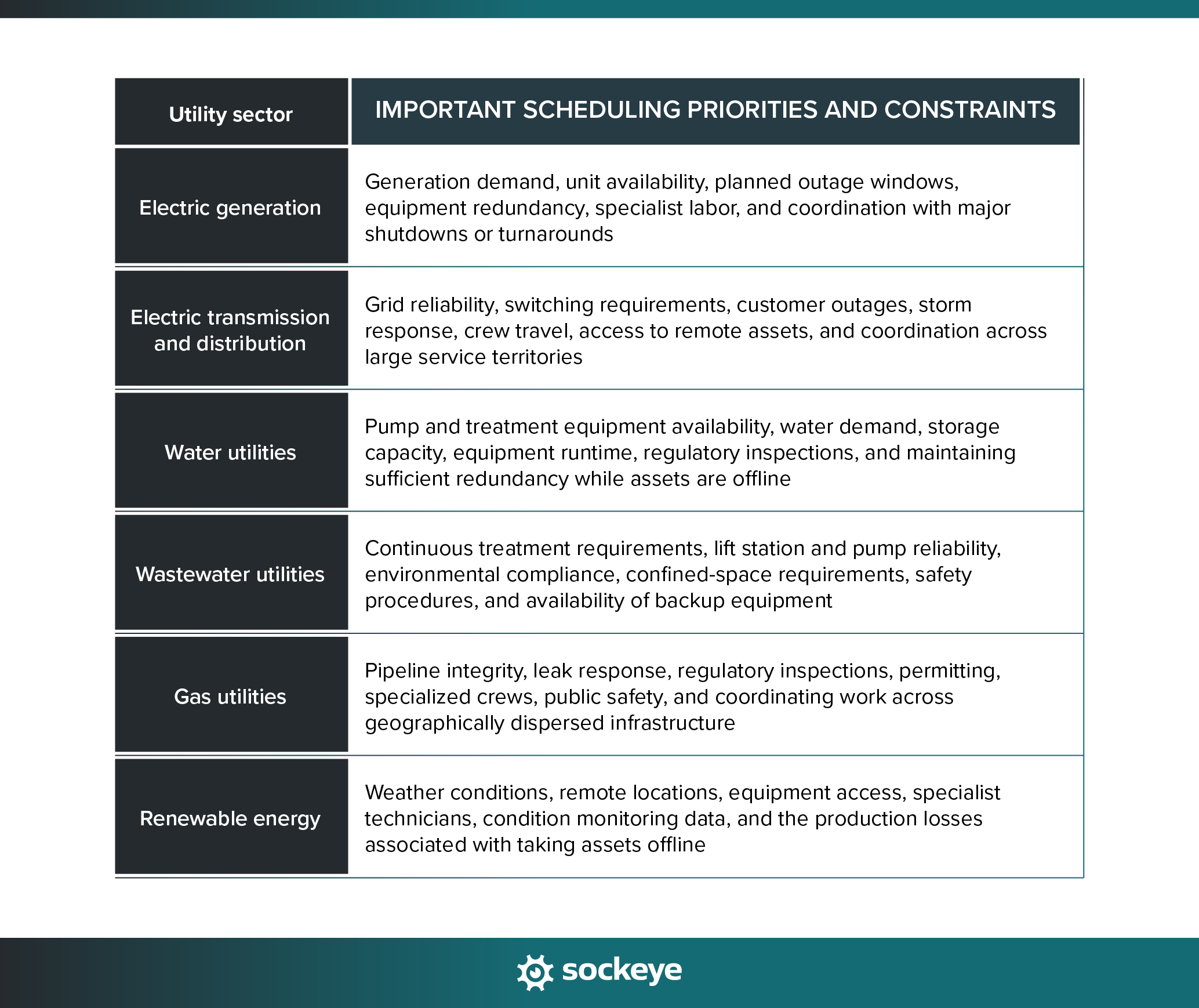
For example, an electric generator may build maintenance schedules around planned outage windows and expected demand, while a water utility may time pump maintenance around storage levels, system demand, and available redundancy. Transmission and distribution teams may place greater emphasis on switching requirements, geography, and the ability to redirect crews when storms or outages occur.
These differences affect how schedules are built, though the underlying objective remains the same: schedule the highest-value work we can safely and realistically execute with the available resources and time windows.
Utility maintenance scheduling best practices
The tools utilities use can make scheduling easier, but software alone will not create a reliable maintenance schedule. The underlying process still needs clear priorities, realistic labor estimates, well-planned work, and a consistent way to handle changing conditions.
The following scheduling best practices apply across most utility sectors (even though the specific operating constraints may differ).
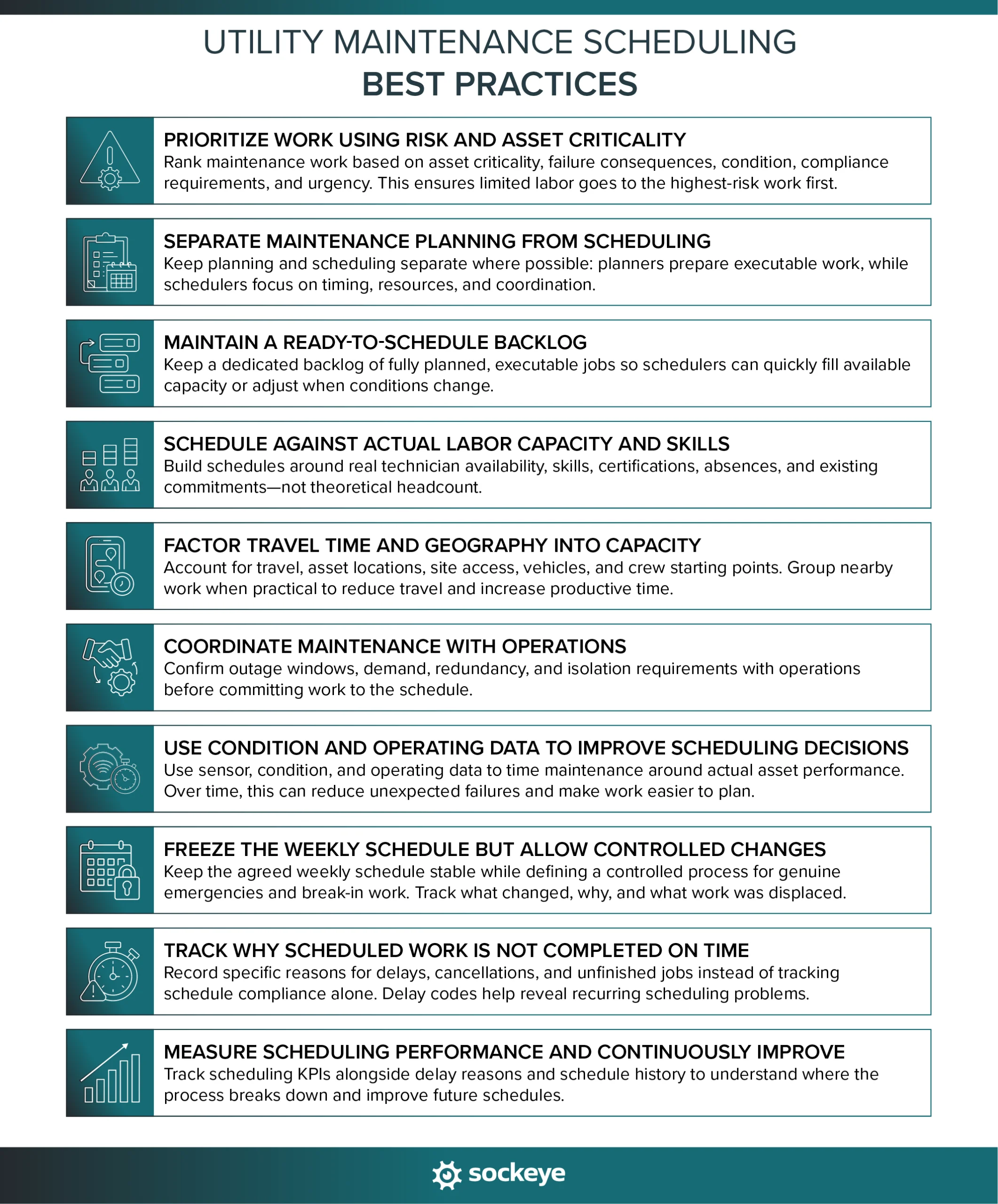
1. Prioritize work using risk and asset criticality
Utilities often have more maintenance work than available labor, which means planners and schedulers need a consistent way to decide which jobs deserve capacity first.
Prioritization should consider factors such as:
- Asset criticality: How important is the asset to service delivery or system reliability?
- Failure consequences: Could failure create safety, environmental, financial, or customer impacts?
- Current asset condition: Are inspections, alarms, or condition data showing signs of deterioration?
- Regulatory requirements: Does the work have a mandatory inspection or compliance deadline?
- Operational impact: What happens if the work is delayed?
- Work urgency: Is the problem stable, deteriorating, or already affecting performance?
Often, the smart thing to do is for maintenance and reliability teams to get together and create a simple equipment risk matrix.
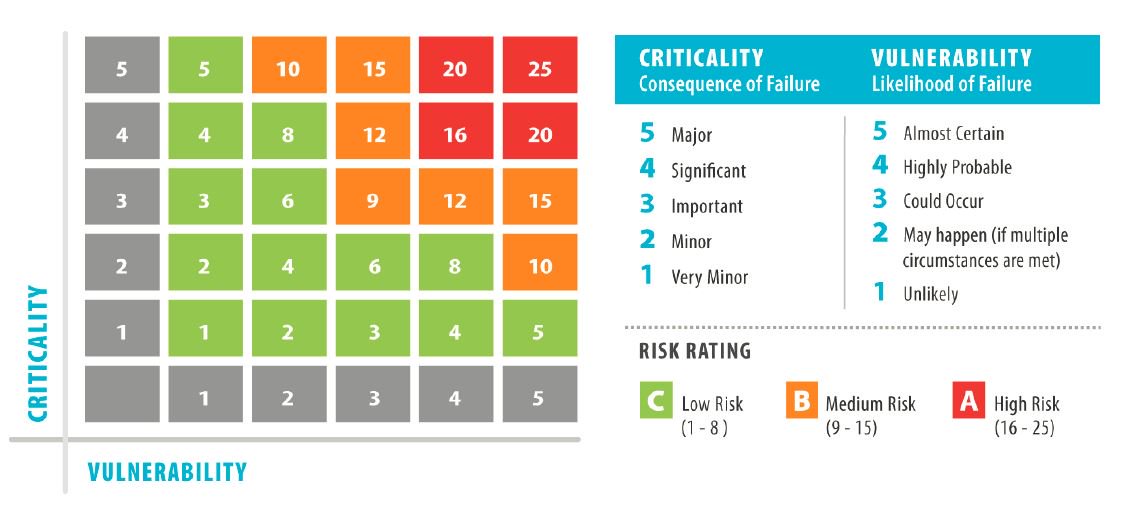
This helps prevent lower-value work from consuming limited labor while higher-risk maintenance remains in the backlog.
2. Separate maintenance planning from scheduling
Maintenance planning and maintenance scheduling are interconnected, but they require different skill sets.
Planners should be methodical and have technical knowledge of equipment and maintenance processes, strong organizational skills, understand technical documentation, good communication skills, and a problem-solving mindset.
Schedulers should have great communication, collaboration, and interpersonal skills, be proficient with using digital tools, and be able to quickly respond in emergencies without getting easily stressed out or bogged down in details.
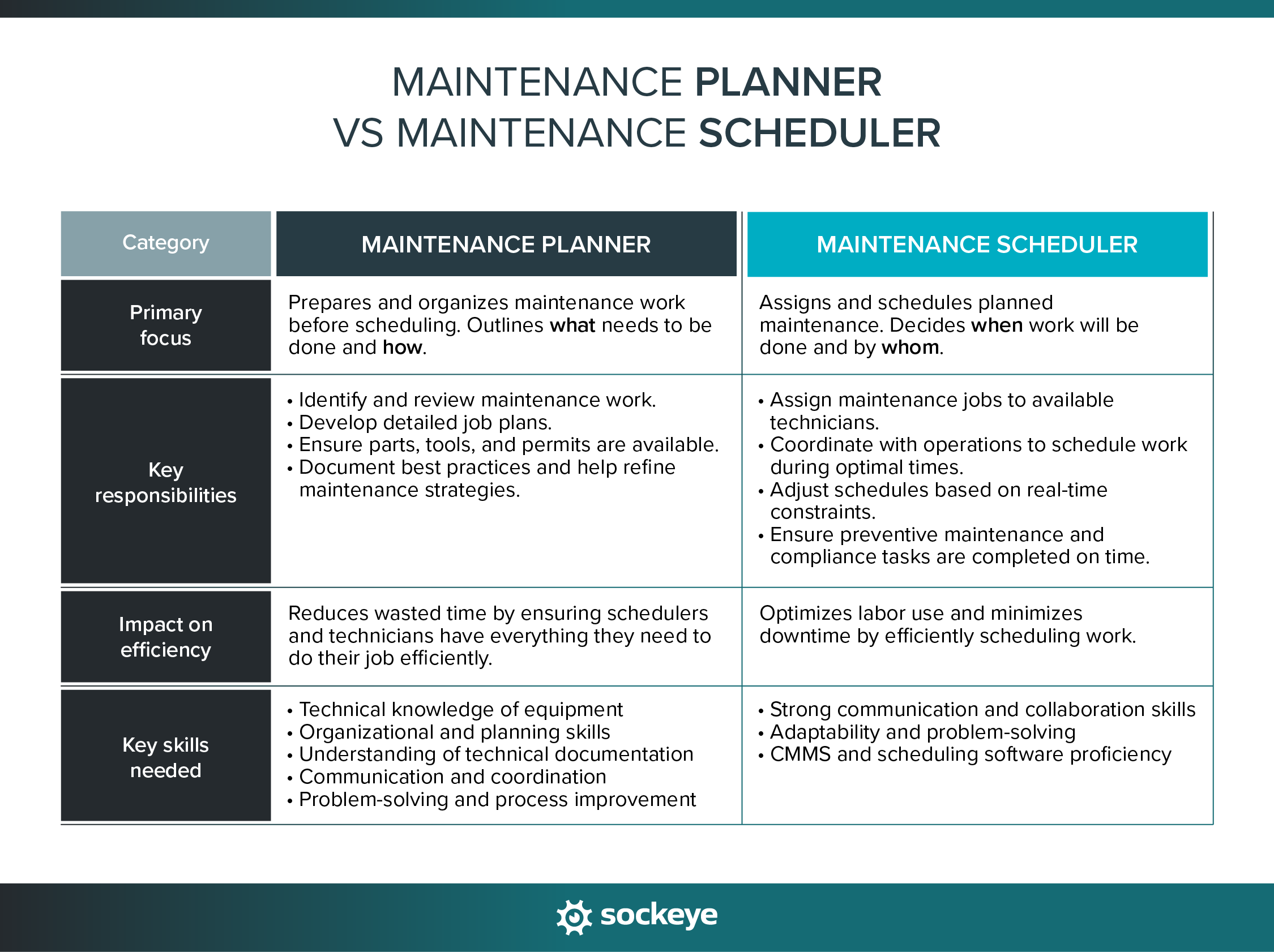
There are situations where it makes sense to merge those two roles, but if you can help it, try to keep them separate.
3. Maintain a ready-to-schedule backlog
Not every open work order should compete for space on the weekly schedule. A useful approach is to maintain a ready-to-schedule backlog containing work that has already been planned and can realistically be executed when labor becomes available.
Schedulers can then select work from this backlog based on priority, available skills, operating windows, and other relevant factors. This is particularly useful when emergency work or changing operating conditions force the schedule to be adjusted.
Keeping ready work separate from jobs that are still waiting for parts, approvals, planning, or access also gives schedulers a more accurate view of actual executable demand. It reduces time spent sorting through work orders that cannot yet be performed and makes it easier to fill newly available capacity.
4. Schedule against actual labor capacity and skills
A realistic maintenance schedule should be based on the labor that is actually available to perform the work, not simply total headcount or theoretical weekly hours.
When calculating capacity, account for factors such as:
- Shift schedules: Who is actually working during the scheduling period?
- PTO and planned absences: Vacations, sick leave, and other time away reduce available hours.
- Training and meetings: Time spent off the tools should not be counted as maintenance capacity.
- Contractor availability: External labor may only be available during certain periods or for specific work.
- Skills and certifications: Some jobs require licensed electricians, operators, switching personnel, specialized mechanics, or other qualified workers.
- Crew requirements: Certain tasks may require multiple technicians or a specific mix of trades.
- Existing commitments: Already assigned work, inspections, standby duties, and recurring tasks reduce the capacity available for new jobs.
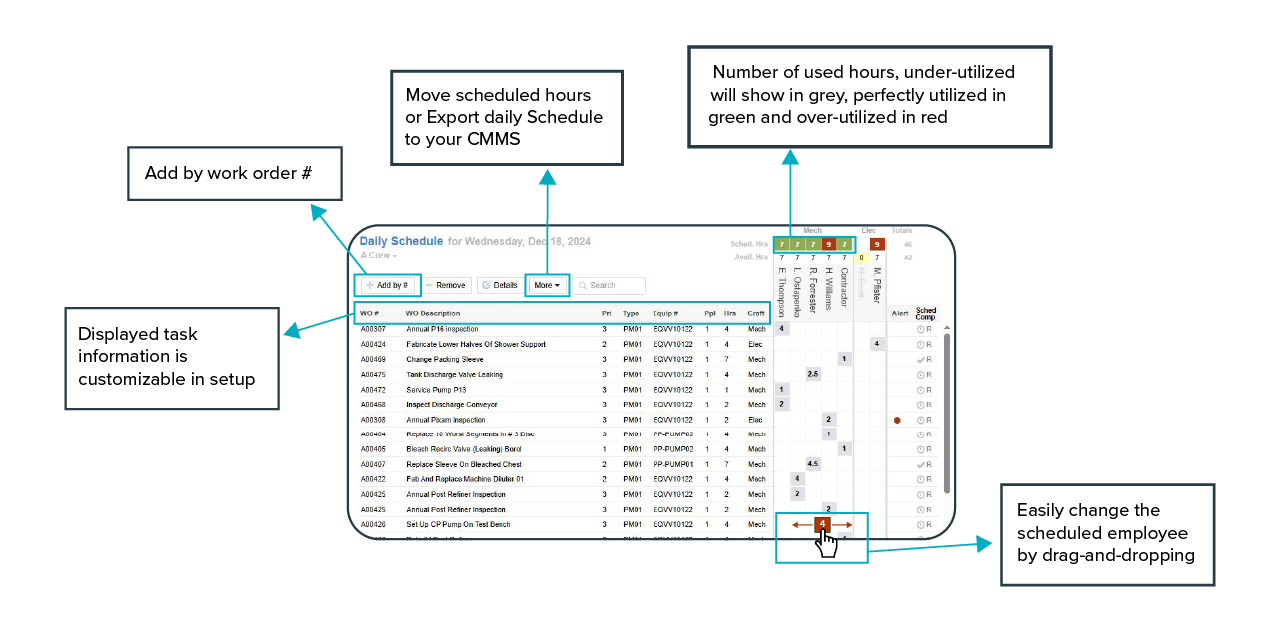
Most of those calculations should NOT be done manually. Your maintenance software should give you an easy way to keep track of technician and contractor availability and utilization (how much capacity they have left).
If it does not, you can use Sockeye to keep available hours current and track crew utilization in real time (upper right corner in the image below) as you schedule and reschedule work.
5. Factor travel time and geography into capacity
For utilities with geographically dispersed assets, technician availability does not equal usable maintenance time. Travel between substations, pumping stations, pipelines, treatment sites, or other remote assets can consume a significant portion of the workday.
Planners and schedulers should account for:
- Travel time between jobs: Especially when crews cover large service territories.
- Asset location: Nearby work can often be grouped to reduce unnecessary driving.
- Site access: Remote or restricted locations may require additional time to reach and enter.
- Vehicle and equipment needs: Some jobs may depend on specific service vehicles, lifts, or other mobile equipment.
- Crew starting locations: Where technicians begin their shift can affect the most practical job sequence.
Where possible, grouping work by location can reduce travel and increase wrench time. However, geography should support — not override — other scheduling priorities like asset criticality.
6. Coordinate maintenance with operations
A maintenance job may be fully planned and have labor available, but that does not mean the asset can be taken out of service at any time. Utilities need to coordinate schedules with operations to identify when maintenance can be performed without creating unnecessary reliability or service risks.
Before committing work to the schedule, confirm factors such as:
- Outage windows: Whether the asset can be safely removed from service.
- System demand: Whether current or expected demand allows the work to proceed.
- Redundancy: Whether backup equipment or alternate capacity is available.
- Switching or isolation requirements: Whether operations personnel need to prepare the system before maintenance begins.
Make sure your maintenance and operations teams talk often. This is going to help identify the best execution windows and prevent many last-minute cancellations.
7. Use condition and operating data to improve scheduling decisions
Many companies now offer plug-and-play IoT sensor deployment. Where appropriate, utilities can use operating and condition data to make maintenance timing more responsive to how an asset is actually being used and how it is performing.
This is not necessarily going to drastically cut down on the volume of work in the short term — some assets will require fewer inspections and repairs while others will require more than average.
However, the work you do will be more effective and easier to plan. In the long term, that is going to lead to fewer unexpected breakdowns, which ultimately will leave more room in the schedule.
8. Freeze the weekly schedule but allow controlled changes
Once the weekly schedule is agreed upon, avoid changing it for routine requests. Constant reshuffling makes it harder for crews to prepare, disrupts coordination with operations, and reduces schedule stability.
At the same time, utility maintenance teams need a controlled way to respond to genuine emergencies and break-in work. A good process should define:
- What qualifies as break-in work: Not every new request should override the existing schedule.
- Who can authorize changes: Clear decision rights help prevent unnecessary reprioritization.
- Which jobs are displaced: Schedulers should record what was delayed or removed to make room for urgent work.
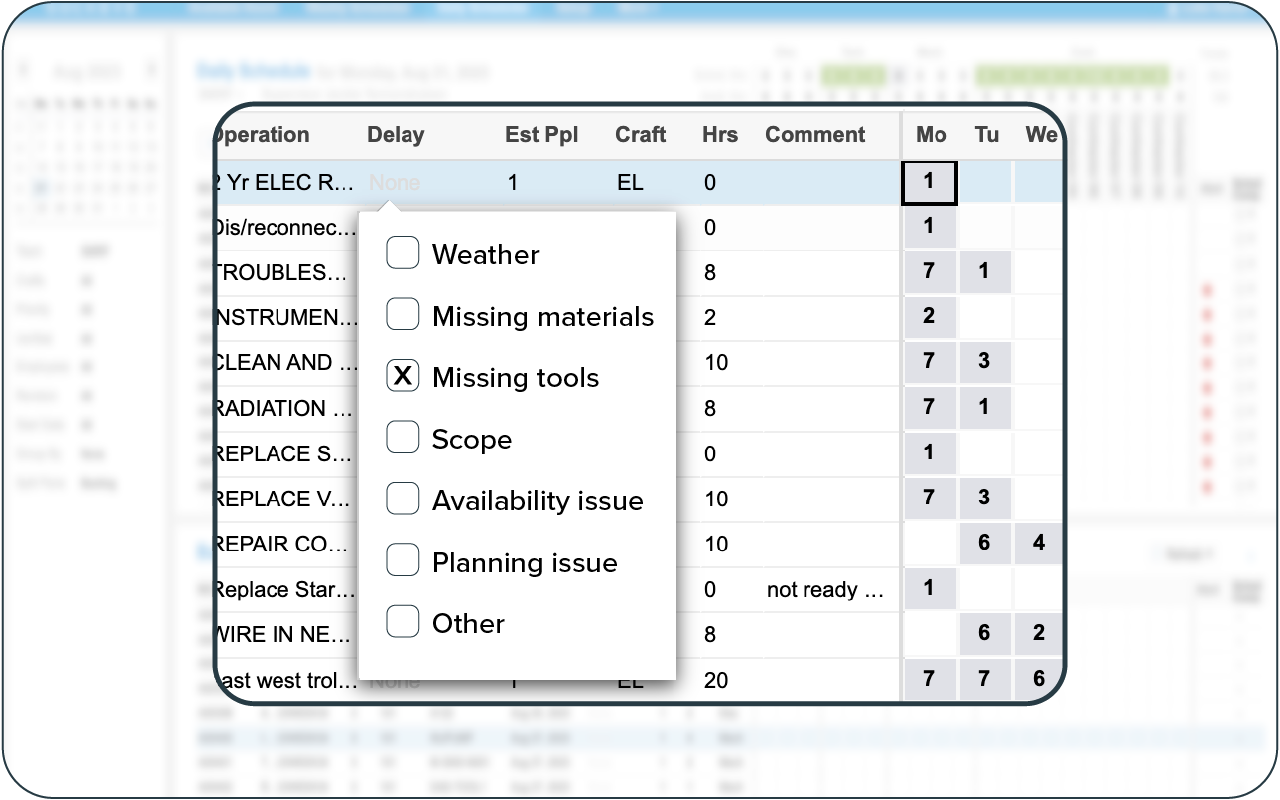
- Why the schedule changed: Reason or delay codes make recurring causes easier to identify.
- What happens to displaced work: Removed jobs should return to the ready backlog and be deliberately rescheduled.
- Which situations justify breaking the schedule: Examples include safety issues, outages, critical failures, major operating constraints, or unexpected resource losses.
Having a structured process helps utilities remain responsive to genuine emergencies without allowing every new request to destabilize the weekly schedule.
9. Track why scheduled work is not completed on time
Maintenance schedule compliance can show whether planned work was completed as scheduled, but it does not explain why the due date was missed. Utilities should also capture the reasons behind delays, cancellations, and unfinished work.
The asset management tool you use should have an easy way to track this. If it’s not built-in as a standalone feature, you should at least be able to leave a comment on the respective work order.
Sockeye users, for example, can create custom drop-down lists of common delay reasons. For each delayed WO, a technician or supervisor can just mark the correct cause.
10. Measure scheduling performance and continuously improve
Maintenance scheduling should be treated as a repeatable process that can be measured and improved. The goal is not simply to hit a single KPI, but to understand where the schedule is breaking down and what changes could make future schedules more realistic.
Useful metrics can include:
- Schedule compliance: Percentage of scheduled work completed as planned.
- PM compliance: Percentage of preventive maintenance completed within the required window.
- Planned vs. unplanned work: Shows how much labor is being consumed by reactive maintenance.
- Emergency work percentage: Indicates how often urgent work disrupts the schedule.
- Backlog size and age: Helps identify whether maintenance demand is growing faster than available capacity.
- Overtime: Can reveal persistent labor shortages or poor workload balancing.
- Wrench time: Shows how much technician time is spent performing productive maintenance work.
The most useful approach is to combine these KPIs with delay codes and schedule history. That helps planners understand not just whether the schedule was missed, but why, so they can adjust planning assumptions, labor allocation, priorities, or supporting processes for the next scheduling cycle.
Build more realistic utility maintenance schedules with Sockeye
Utility maintenance teams often already have a capable CMMS or EAM in place. The problem is that building and adjusting the weekly schedule can still require spreadsheets, manual labor checks, or dozens of clicks to make a simple schedule change.
Sockeye adds a dedicated scheduling layer on top of systems such as SAP PM, IBM Maximo, eMmaint, and others. It brings work demand and labor availability into one scheduling view so planners can:
- Match work to available skills and competencies
- Account for shifts, PTO, and contractor availability
- Easily balance workload across technicians and crews
- Build schedules with drag-and-drop or automated assignment
- Adjust work quickly when emergencies or resource changes disrupt the plan
- Track schedule compliance, delay reasons, and other scheduling KPIs.
Because Sockeye works alongside your existing CMMS/EAM, you can improve the scheduling process without replacing the system your maintenance team already uses.
If your utility is still building weekly schedules in spreadsheets or struggling to keep labor availability, work priorities, and schedule changes aligned, schedule a Sockeye demo to see how a dedicated scheduling tool can simplify the process.
