
Maintenance teams waste a surprising amount of time on activities that have little to do with actual maintenance work. Chasing approvals, updating spreadsheets, tracking down information, and coordinating schedules can all slow down execution.
Maintenance workflow optimization and automation help eliminate these inefficiencies. By improving how work moves through your maintenance department and automating repetitive tasks, you can free up time, reduce delays, and get more work done with the resources you currently have.
This guide explores practical optimization opportunities, a step-by-step improvement framework you can apply to any maintenance process, and the technologies that can help you put it all into practice.
QUICK TAKEAWAYS
- Maintenance workflow optimization improves processes, while automation reduces the manual effort needed to execute them.
- Optimize and standardize maintenance workflows before automating them to avoid reinforcing existing inefficiencies.
- Start by identifying your biggest bottlenecks and prioritizing improvements with the highest potential impact.
- CMMS, EAM, scheduling software, IoT, and other technologies support different aspects of maintenance workflow optimization and automation.
- AI is expanding automation opportunities, but many applications come at a significant cost.
The relationship between workflow optimization and automation
Maintenance workflow optimization is the process of improving how maintenance work is requested, prioritized, planned, scheduled, executed, and documented. The goal is to eliminate unnecessary steps, reduce delays, make better use of resources, and keep equipment running reliably.
Maintenance workflow automation takes this further by using software to complete repetitive tasks, move work between stages, trigger actions, and coordinate maintenance activities with less manual intervention.
While automation could be considered a subset of optimization, it’s better to treat them as two distinct concepts that work together:
- Optimization focuses on improving the process itself: Think eliminating unnecessary approvals, standardizing work order information, or ensuring jobs are fully planned before scheduling.
- Automation reduces the manual effort required to run that process: Think automatically routing work orders for approval, generating preventive maintenance tasks based on existing templates, or notifying technicians as soon as their assigned jobs are ready.
Imagine a maintenance team that spends hours every week manually updating its schedule in Excel. Moving that process into a CMMS can reduce manual work, but the team may still struggle if work orders lack accurate labor estimates or technician availability isn’t properly tracked.
This is why, as a general rule, you should optimize workflows before automating them. Otherwise, you risk making an inefficient process run faster without fixing its underlying problems.
Maintenance management workflow optimization examples
Opportunities to optimize your internal workflow exist at every stage of the maintenance management process — from identifying work to analyzing completed jobs. Some improvements will eliminate unnecessary steps, while others might standardize procedures, improve coordination, or introduce automation.
The opportunities available to you depend largely on the maturity of your existing processes.
If your team creates weekly maintenance schedules in Excel, moving to a CMMS can eliminate duplicate data entry and improve work order visibility. If you already use a CMMS, optimization could mean revising your work priority matrix, improving labor availability tracking, or even automating schedule building with additional tools like Sockeye.
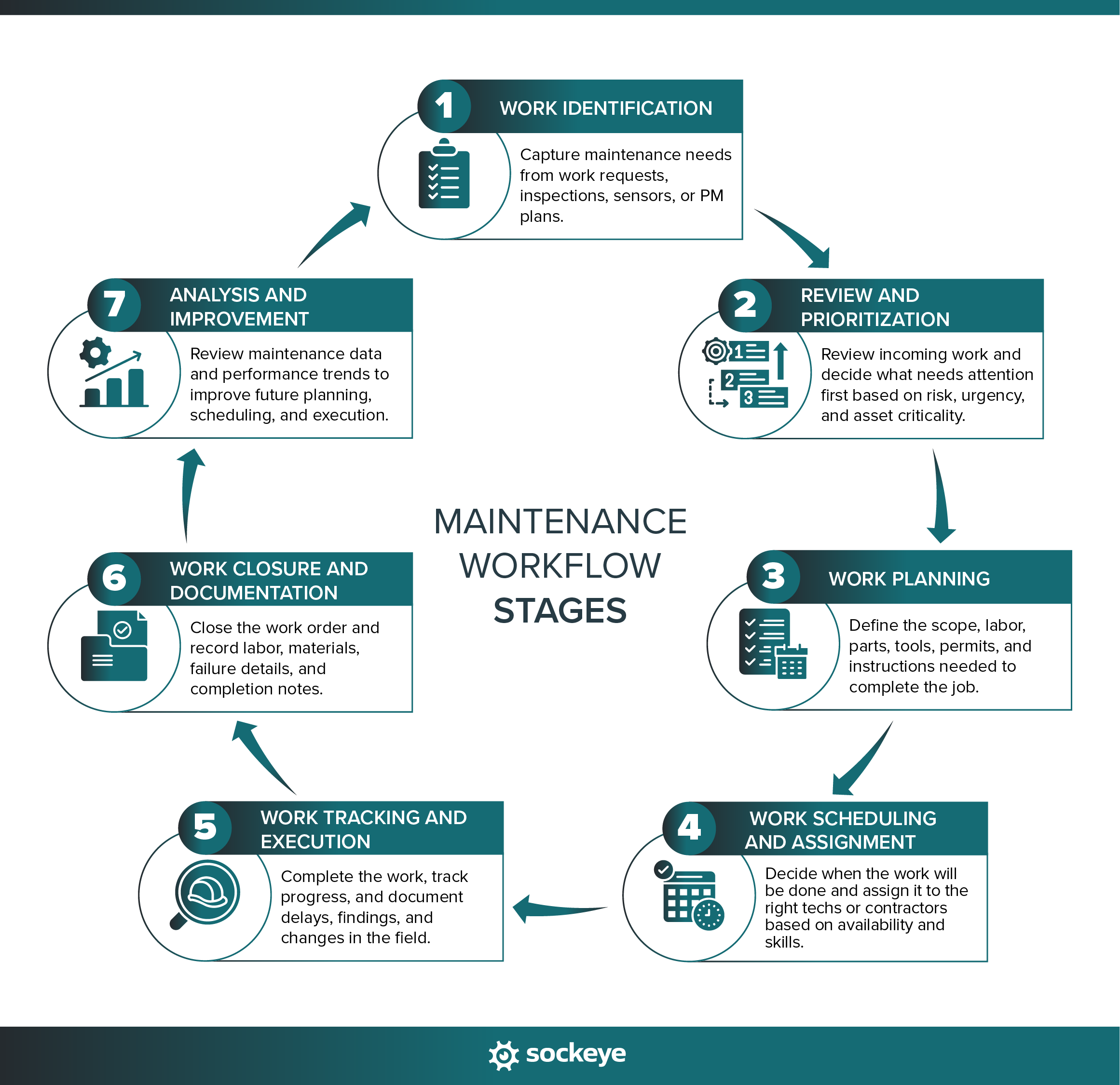
The following table highlights practical optimization and automation opportunities across seven key stages of the maintenance workflow.
| Maintenance workflow stage | Optimization opportunities | Automation opportunities |
|---|---|---|
| 1. Work identification | 1. Standardize maintenance request forms and required fields. 2. Establish clear criteria for submitting work requests. 3. Simplify how technicians report equipment issues. 4. Reduce duplicate or incomplete requests. | 1. Automatically generate preventive maintenance work orders. 2. Trigger requests based on IoT sensor readings. 3. Auto-populate asset information when submitting requests using QR labels on assets. |
| 2. Review and prioritization | 1. Establish consistent work priority criteria. 2. Define which requests require approval. 3. Eliminate unnecessary approval steps. | 1. Automatically route requests to designated reviewers/team. 2. Assign default priorities using predefined rules. 3. Escalate requests that remain unreviewed. 4. Use a CMMS that can recognize and flag duplicate requests. |
| 3. Work planning | 1. Standardize job plans for recurring tasks. 2. Improve labor-hour and duration estimates based on tech feedback. 3. Identify required parts, tools, and permits before scheduling. 4. Separate planning from scheduling responsibilities. | 1. Attach standard job plans to recurring work orders. 2. Populate predefined labor and material requirements. 3. Flag missing parts or incomplete planning information. 4. Trigger purchasing workflows when inventory is insufficient. |
| 4. Work scheduling and assignment | 1. Account for technician availability, skills, and shifts. 2. Group jobs to reduce travel and setup time. 3. Balance workloads against available labor capacity. 4. Establish consistent scheduling priorities | 1. Use maintenance software that can automatically build a schedule by matching planned jobs with qualified technicians based on real-time utilization and availability. 2. Automatically notify technicians about assignment changes. |
| 5. Work tracking and execution | 1. Standardize work order statuses. 2. Provide mobile access to instructions and asset history. 3. Standardize shift handover procedure. | 1. Update statuses based on workflow events. 2. Trigger follow-up tasks when inspections identify defects. 3. Send overdue work reminders. |
| 6. Work closure and documentation | 1. Standardize required work order completion information. 2. Simplify time, material, and failure-code entry through standardized forms and drop-downs. 3. Establish consistent failure documentation standards. | 1. Define mandatory fields for WO closure. 2. Let the system record timestamps and user activity. 3. Update maintenance history automatically. 4. Trigger follow-up work from inspection results. |
| 7. Analysis and improvement | 1. Define and implement failure codes and delay reason codes. 2. Standardize reporting methods and KPIs, especially if benchmarking multiple sites. 4. Establish regular performance reviews. | 1. Use built-in (or create custom) dashboards to track specific metrics in real time. 2. Build custom reports and make them generate repeatedly. 3. Build different dashboards or reports for different stakeholders. |
Keep in mind that these improvements vary significantly in implementation complexity.
Automating PM work order creation is relatively straightforward because the triggering rules are usually well defined. Automatically building an optimized weekly maintenance schedule is considerably more complex because it requires balancing labor, equipment availability, job priorities, and other constraints.
A framework for optimizing any maintenance workflow
The core maintenance workflow can be split into several stages, each involving different people, processes, and dependencies. Making changes to multiple stages simultaneously often makes it difficult to identify what works and what doesn’t.
A more practical approach is to break the maintenance workflow into smaller components and improve them one at a time. Start with the areas causing the biggest delays, unnecessary costs, or operational problems.
The following five-step framework can help you optimize almost any maintenance process. We’ll use maintenance scheduling as a running example to show how each step works in practice.
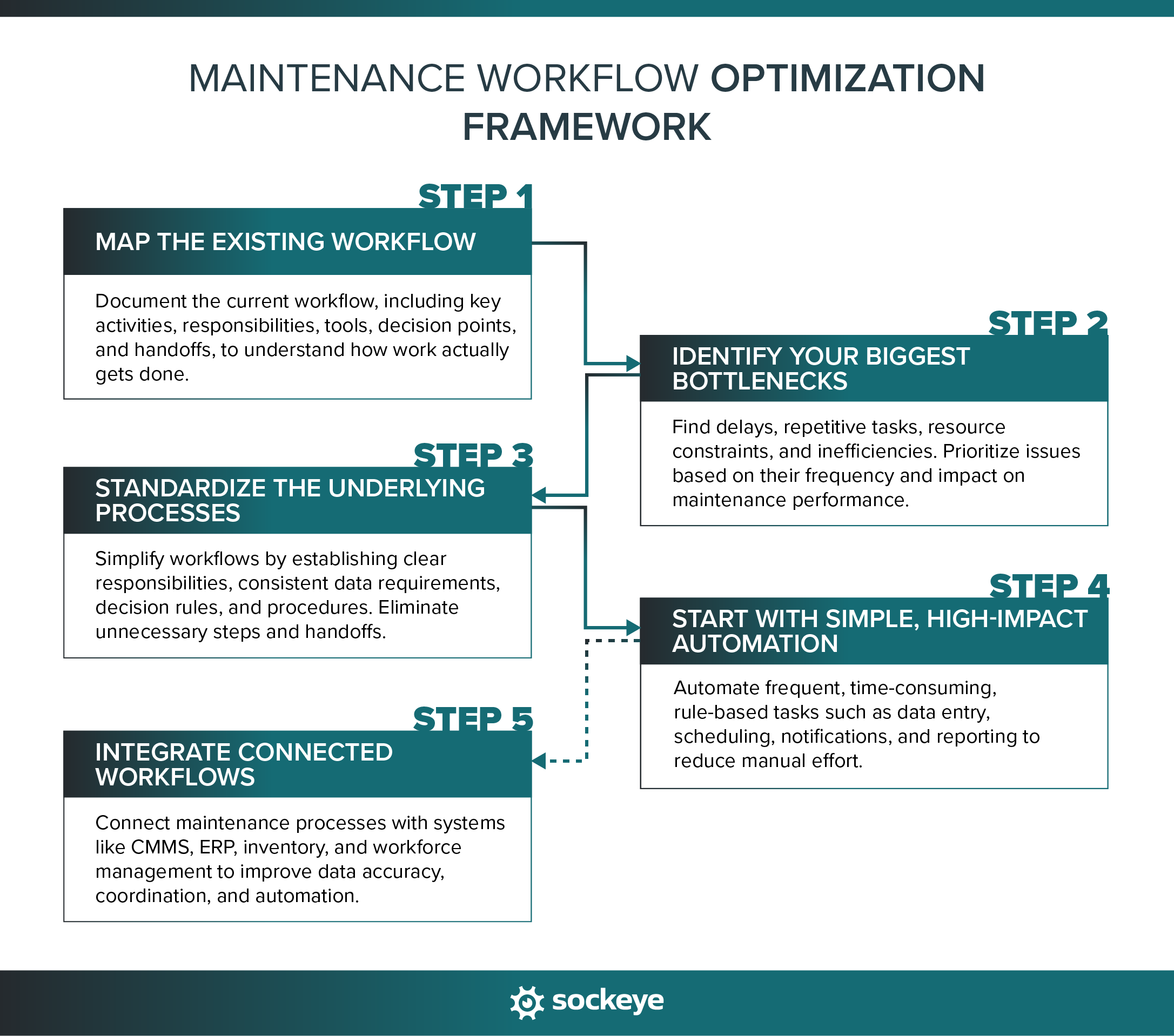
Step 1: Map the existing workflow
Before making changes, you need a clear picture of how the current process works — not just how it’s supposed to work on paper.
Start by documenting each activity, from the event that triggers the workflow to its final output. Identify who is responsible for each step, what information and tools they use, and where work gets handed off to another person or department.
Your workflow map should capture:
- Key activities: What needs to happen at each stage of the process.
- Roles and responsibilities: Who performs each task, makes decisions, and approves work.
- Inputs and outputs: What information is required to start each activity and what it produces.
- Tools and systems: Which spreadsheets, software platforms, and communication channels are involved.
- Decision points and handoffs: Where work requires approval, additional information, or input from another person.
EXAMPLE: Mapping the weekly maintenance scheduling process
- The planner reviews the backlog and identifies work orders ready for scheduling.
- The scheduler exports those work orders from the CMMS into Excel.
- The scheduler contacts supervisors to confirm technician availability and planned absences.
- The scheduler manually assigns jobs to technicians based on available labor and estimated durations.
- The maintenance supervisor reviews the proposed schedule and requests changes.
- The scheduler updates the spreadsheet and distributes the final schedule to technicians.
Mapping this process reveals where the team relies on manual data entry, separate spreadsheets, and repeated communication. It also establishes a starting point for identifying bottlenecks in the next step.
Step 2: Identify your biggest bottlenecks
Once you’ve mapped the existing workflow, identify where work gets delayed, where resources are wasted, and which activities create unnecessary manual effort.
Look for recurring problems such as:
- Long waiting times: Work sits idle while someone provides information, makes a decision, or approves the next step.
- Repetitive manual tasks: Employees repeatedly enter the same information, update spreadsheets, or send routine notifications.
- Unnecessary handoffs: Work moves between too many people or departments before it can progress.
- Poor data quality: Missing, inaccurate, or outdated information causes delays, mistakes, and rework.
- Resource constraints: A lack of available labor, tools (analog or digital), materials, or equipment access prevents work from moving forward.
Not every inefficiency deserves immediate attention. Prioritize bottlenecks based on how frequently they occur, how much time or money they waste, and how significantly they affect maintenance performance.
EXAMPLE: Identifying maintenance scheduling bottlenecks
After mapping the weekly scheduling process, our maintenance team discovers three recurring problems:
- The scheduler spends several hours manually exporting work orders and updating the Excel schedule.
- Technician availability information is often outdated, forcing the scheduler to repeatedly contact supervisors and adjust assignments.
- Some jobs are added to the schedule before the required parts are available, resulting in last-minute cancellations and rescheduling.
The team determines that inaccurate labor availability and scheduling unready work orders cause the most disruption. These become the primary targets for optimization, while reducing spreadsheet work remains an additional opportunity for automation.
TIP: Whenever possible, support your findings with actual data. For example, track how much time the scheduler spends preparing weekly schedules, how often jobs need to be rescheduled, and why scheduled work gets delayed. These measurements will also help you evaluate whether your improvements are working.
Step 3: Standardize the underlying processes
Start by reviewing the problems identified in the previous step. Look for opportunities to eliminate unnecessary activities, simplify decision-making, and establish clear rules for how work should move through the process.
Focus on:
- Data standardization: Define what information must be available before work can move to the next stage. If you are using a CMMS, you can do this by creating custom forms, standardizing data inputs (minutes vs hours, kg vs pounds, etc.), and defining optional and required fields for submitting different forms.
- Clarifying responsibilities: Establish who performs each task, makes decisions, and approves changes.
- Defining decision rules: Create consistent criteria for prioritizing, assigning, approving, or escalating work.
- Creating SOPs and checklists: Maintenance SOPs and checklists are an excellent way to ensure work gets done quickly and safely, regardless of who is performing it. Bonus if they come in a digital form and include helpful visuals.
- Using templates: Your CMMS will often let you create templates for different types of work orders, PMs, work request forms, and so on. This can help speed up various parts of the maintenance workflow.
- Eliminating unnecessary steps: Remove duplicate data entry, redundant approvals, and handoffs that add little value.
- Handling exceptions: Establish procedures for urgent requests, missing information, and other situations that interrupt the normal workflow.
EXAMPLE: Standardizing the maintenance scheduling process
To address the bottlenecks identified in Step 2, our maintenance team introduces several changes:
- Work readiness criteria: Only work orders with approved job plans, labor estimates, and confirmed material availability can enter the ready-to-schedule backlog.
- Labor availability updates: The team implements Sockeye and uses its Labor Availability Dashboard (or designs its own way) to keep tech and contractor availability up to date. Supervisors get a new task to review and update availability at the beginning of each week, or whenever they get notified about a sudden change (like sick leave).
- Schedule review: The scheduler and maintenance supervisor review the proposed schedule at a fixed time each week, with clear responsibilities for approving changes.
These improvements make the scheduling process more predictable and reduce the amount of clarification and rework required. More importantly, they establish consistent inputs and decision rules that work order scheduling software can use for automation — which is the next step in the framework.
Step 4: Start with simple, high-impact automation
Look for activities that are frequent, time-consuming, and governed by clear rules. These are generally easier to automate because the software doesn’t need to make judgment calls.
Good candidates for automation include:
- Data entry and updates: Automatically populate fields, transfer information between systems, and update records when predefined conditions are met.
- Notifications and reminders: Alert employees about new assignments, pending approvals, deadlines, or changes in work status.
- Task creation and routing: Generate recurring work orders, assign tasks, and move requests through approval workflows.
- Rule-based decisions: Automatically categorize, prioritize, or escalate work based on predefined criteria.
- Reporting: Calculate KPIs, update dashboards, and distribute recurring performance reports.
EXAMPLE: Automating maintenance scheduling
With standardized scheduling procedures in place, our maintenance team can begin introducing automation:
- Automate work order data transfer: Instead of manually exporting work orders into Excel, use scheduling software that pulls ready-to-schedule work orders directly from the CMMS.
- Automate scheduling process: A scheduling bolt-on like Sockeye will use predefined skill requirements and availability rules to schedule selected work orders automatically. The scheduler can review and refine the schedule before making it official.
- Automate schedule communication: Set the system to automatically notify technicians when the weekly schedule is published or their assignments change.
These changes reduce the administrative effort required to prepare and maintain the weekly schedule.
More advanced automation, such as generating fully optimized schedules with the help of AI, can be considered later. Such capabilities require more sophisticated scheduling logic, clean and reliable data, and a large budget.
Step 5 (Optional): Integrate connected workflows
This step is for more mature maintenance departments. It centers on finding opportunities to connect individual processes with other maintenance workflows and business systems.
Many maintenance activities depend on information managed elsewhere in the organization. For example, scheduling depends on work planning, labor availability, spare parts inventory, and production schedules. When these processes run in separate systems, employees often have to transfer information or manually coordinate updates.
Integrating connected workflows can help you:
- Eliminate duplicate data entry: Automatically synchronize relevant information between CMMS, ERP, scheduling, inventory, and other systems.
- Improve cross-department coordination: Share updates between maintenance, operations, procurement, and other departments.
- Automate cross-functional workflows: Trigger actions in one system based on events or status changes in another.
- Improve data accuracy: Reduce inconsistencies caused by manually maintaining the same information in multiple systems.
- Enable more advanced automation: Use information from connected systems to support decisions that would otherwise require manual coordination.
EXAMPLE: Integrating maintenance scheduling with connected workflows
The maintenance team in our example has already standardized and automated the scheduling process. The next step is to connect scheduling with other systems and processes:
- HR or workforce management software integration: Import technician shifts, approved leave, and other availability information to maintain accurate labor capacity with minimal manual tracking.
- Inventory integration: Use spare parts availability to identify jobs that are ready for scheduling and flag those awaiting materials.
- Production scheduling integration: Share planned equipment downtime and production constraints to identify suitable maintenance windows.
- PdM platform integration: Leverage real-time sensor data and predictive maintenance algorithms to get timely warnings about equipment issues and scheduling recommendations. This gives planners and schedulers more time to coordinate resources, prioritize work, and optimize work timing.
These integrations allow teams to make scheduling decisions based on accurate and up-to-date information without needing to manually check multiple systems. That said, depending on the systems you use, those same integrations can introduce additional complexity, costs, and maintenance requirements. Evaluate whether the expected benefits justify the effort before connecting new systems.
How modern technologies support process optimization and automation
A CMMS or EAM platform typically serves as the foundation. Then, depending on your operational needs, you can extend its capabilities with specialized tools or integrate it with other business systems to automate workflows that span multiple departments.
The following table summarizes the main technology categories and their roles in maintenance workflow optimization and automation.
| Technology category | Role in workflow optimization and automation | Examples |
|---|---|---|
| CMMS software | Centralizes work orders, asset records, preventive maintenance, and maintenance history. Automates recurring tasks, notifications, work assignments, and approval workflows. Enables digital forms, checklists, and templates. | MaintainX, Limble, Fiix, Maintenance Connection |
| EAM software | Same as CMMS, plus advanced approval workflows and more native integrations with purchasing and resource management. | IBM Maximo, SAP S/4HANA, HxGN EAM |
| Maintenance scheduling software and bolt-ons | Gives real-time labor utilization tracking, automates parts of the scheduling process and workload balancing. Direct integrations with most CMMS and EAM platforms. | Sockeye, Prometheus Scheduler |
| IoT sensors and condition-monitoring devices | Collect real-time equipment data, such as vibration, temperature, pressure, and operating hours. Automatically alert maintenance teams when measurements exceed predefined thresholds or trigger condition-based maintenance workflows. | Banner Engineering, Monnit, Honeywell, Rockwell Engineering |
| Predictive maintenance (PdM) platforms | Analyze equipment condition, operating data, and historical patterns to identify developing faults and estimate failure risks. Help teams prioritize interventions, optimize maintenance timing, and automatically generate alerts or maintenance recommendations. | Augury, Siemens Senseye, VibeCloud, AVEVA |
| Business intelligence (BI) and analytics software | Combines maintenance data from different systems, automates KPI reporting, and helps identify recurring failures, scheduling inefficiencies, and performance trends. | Microsoft Power BI, Tableau, Qlik Sense |
| Workflow automation and integration platforms | Connects applications and automates information transfers, notifications, approvals, and other workflows that span multiple systems. | Microsoft Power Automate, Zapier, Workato |
Before adding another application to your maintenance technology stack, evaluate what your existing software can already do. Specialized tools make the most sense when they address a specific bottleneck, provide capabilities your current system lacks, or significantly simplify a process that would otherwise require extensive configuration.
The rising role of AI in maintenance workflow automation and optimization
Artificial intelligence is creating new opportunities to optimize and automate maintenance workflows.
In contrast to traditional automation that relies primarily on predefined rules, AI can analyze historical data, recognize patterns, generate content, and recommend actions based on changing conditions.
This opens the door to automating activities that previously required significant manual effort or human judgment — from estimating job durations and analyzing equipment failures to preparing work orders and identifying scheduling conflicts.
Many maintenance software vendors are already introducing practical AI capabilities into their platforms. Here are a few examples:
- Limble – Asset Snap: Uses AI-powered image and text recognition to extract asset details from equipment nameplate photos, reducing manual data entry when creating asset records.
- MaintainX – Smart Time Estimates: Analyzes historical work orders to estimate how long new maintenance jobs should take, helping teams improve labor planning and scheduling accuracy.
- Fiix – Parts Forecaster: Uses historical maintenance and inventory data to predict spare parts demand and recommend purchasing quantities, helping teams avoid stockouts and unnecessary inventory.
- IBM Maximo – AI-powered problem code recommendations: Analyzes work order descriptions and suggests relevant problem codes, helping maintenance teams classify equipment issues more consistently.
- UpKeep – AI Voice Fill: Lets technicians create work orders and enter maintenance information through spoken instructions, reducing the time spent typing and navigating forms.
- Microsoft Dynamics 365 Field Service – Copilot Work Order Summaries: Uses AI to summarize work order details, including status, maintenance history, required parts, and next steps, helping technicians and supervisors review jobs without manually searching through records.
- eMaint – AI-powered SOP generation: Generates draft standard operating procedures (SOPs) from uploaded equipment manuals and documentation, reducing the manual effort required to create standardized maintenance instructions.
These are relatively focused applications, but they illustrate how AI can improve individual steps of the maintenance workflow without requiring a complete overhaul of existing processes.
However, AI still depends on reliable maintenance data, clearly defined processes, and appropriate human oversight. The greatest value will likely come from combining AI capabilities with well-optimized workflows, rather than expecting AI to compensate for highly inefficient processes.
Automate and optimize maintenance scheduling with Sockeye
Maintenance scheduling is one of the more challenging workflows to optimize and automate. Schedulers need to balance job priorities, technician availability, skill requirements, and equipment access — all while dealing with unexpected breakdowns and last-minute changes.
Sockeye is a dedicated maintenance scheduling solution that integrates with your existing CMMS or EAM. Instead of replacing your maintenance management system, Sockeye simplifies the scheduling and rescheduling process.
It does that by:
- Automating technician assignments: Match ready-to-schedule work orders with available technicians based on their skills and availability.
- Improving labor capacity planning: Account for technician availability, planned absences, and contractor capacity to build more realistic schedules.
- Simplifying schedule adjustments: Use a super simple scheduling interface and drag-and-drop functionality to quickly reschedule work without ruining your existing schedule.
- Reducing manual data entry: Keep work order and scheduling information synchronized through integrations with your existing CMMS or EAM.
- Improving scheduling performance: Track schedule compliance, labor utilization, delay reasons, and other KPIs to identify opportunities for further improvement.
Sockeye’s main advantage is its focus on making maintenance scheduling simpler.
Schedulers can see ready-to-schedule work, available labor, and current assignments in one interface instead of switching between several spreadsheets and complex CMMS screens. The software is designed to be learned in one hour, making it easier to introduce consistent scheduling practices across maintenance teams.
If you are interested in learn more, reach out to our team.
How does your preventive maintenance scheduling really stack up?
11 questions, most of them one tap. Get your Scheduling Maturity score, see how you compare to typical and world-class plants, and take the one-page summary to your next review. No sales call.
Score yourself against typical and world-class plants.
