
Not every maintenance task needs a brand-new work order. For routine, repetitive work, constantly creating and closing separate work orders can waste time and clutter your system.
Standing work orders offer a simpler way to manage ongoing maintenance activities, but only when applied correctly. Used too broadly, they can lead to missing data, poor tracking, and less control over maintenance operations.
In this short guide, we’ll break down when standing work orders make sense, when they create more problems than they solve, and how to use them effectively without compromising visibility or accountability.
What are standing work orders?
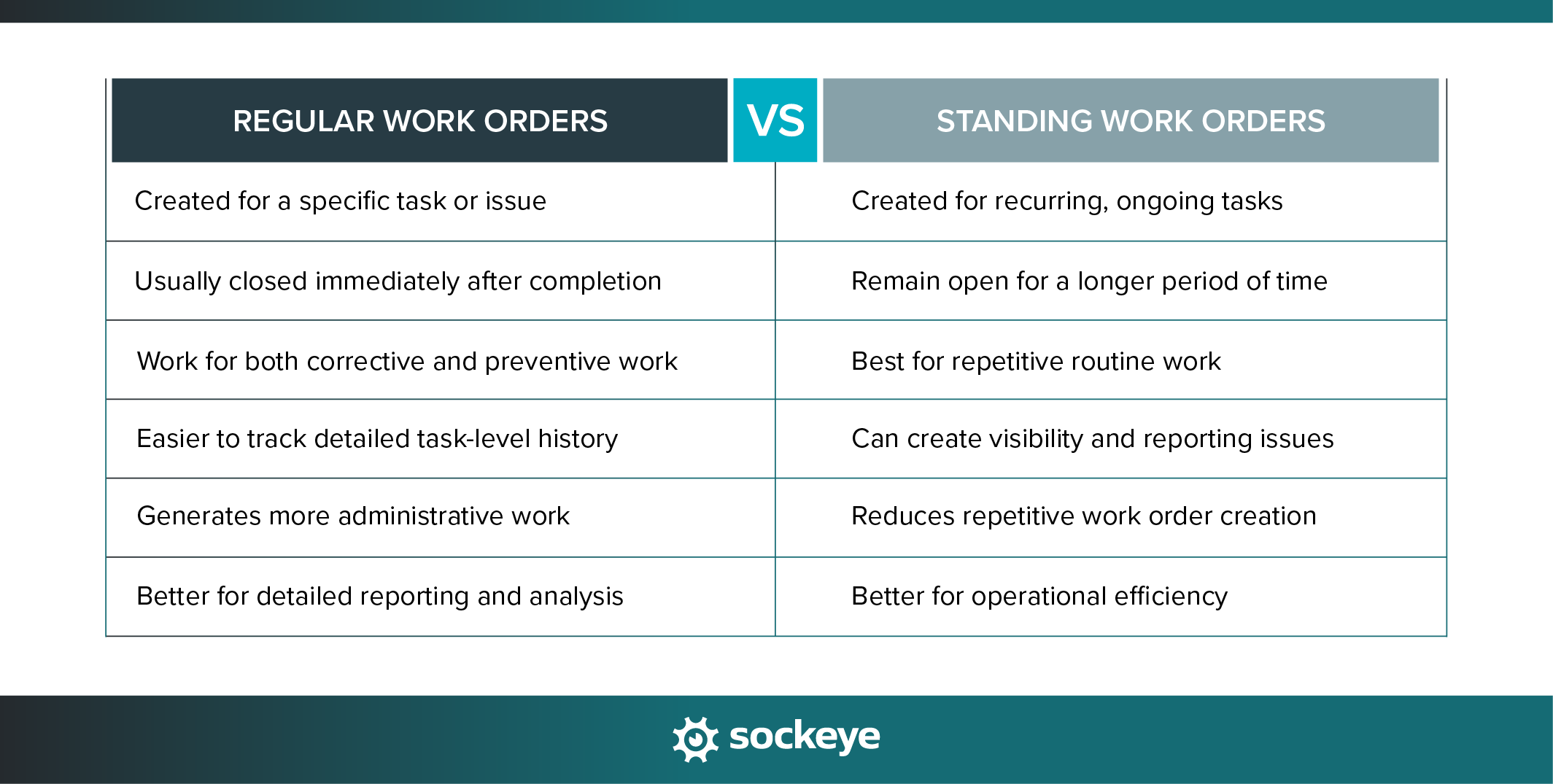
Standing work orders are long-term work orders that stay open for recurring or ongoing maintenance tasks instead of being created and closed repeatedly. They can be used for common routine activities, such as inspections, cleaning, lubrication, grounds maintenance, or general facility upkeep.
This helps reduce administrative work, save time on scheduling, and make it easier to manage maintenance activities that are repetitive, predictable, and low risk.
When to use standing work orders
As we mentioned, standing work orders are useful for routine tasks that happen frequently and do not require extensive documentation every time they are performed.
They also help maintenance teams avoid cluttering their CMMS or work order scheduling software with tens or hundreds of nearly identical work orders.
Here are some situations where standing work orders can make sense:
- Routine inspections: Daily or weekly inspections are repetitive by nature, making them a good match for standing work orders. Using one ongoing work order helps reduce paperwork while ensuring inspections continue consistently.
- General maintenance activities: Tasks like cleaning, lubrication, and housekeeping happen continuously and do not necessarily require separate work orders for every occurrence. The exceptions are industries with strict compliance that need a clear audit trail, like food processing equipment maintenance.
- Operator rounds and walkthroughs: Maintenance or operations teams often perform recurring equipment checks throughout the facility. A standing work order can simplify tracking these ongoing responsibilities.
- Seasonal maintenance work: Activities like snow removal, landscaping, or cooling tower monitoring may continue for weeks or months during certain seasons, making a standing work order more practical.
- High-frequency preventive maintenance tasks: Some PM activities occur so frequently that creating individual work orders becomes inefficient. Standing work orders can streamline these recurring tasks.
- Low-risk, low-complexity tasks: Simple maintenance activities that do not require detailed failure analysis or extensive reporting are often good candidates for standing work orders.
- Facility support services: Work such as waste collection, janitorial support, or routine building upkeep is ongoing and operational in nature, which fits well within a standing work order structure.
- Tasks with predictable labor requirements: When the work is repetitive and standardized, standing work orders’ labor requirements are much easier to account for during your WO planning and scheduling process.
When to avoid using standing work orders
While standing work orders can improve efficiency, they can also create problems when used for the wrong types of maintenance activities.
One of the biggest risks is losing visibility into important maintenance data. Because standing WOs remain open for long periods, it becomes harder to track individual tasks, delay reasons, labor hours, material usage, and other details.
Over time, this can lead to weaker reporting, reduced accountability, and gaps in maintenance records. If not managed carefully, standing work orders can also become overly broad, disorganized, and near-impossible to audit.
Here are some of the situations where standing work orders are not recommended:
- Corrective maintenance and breakdown repairs: Equipment failures and unexpected issues should usually have their own work orders so teams can properly document the cause, repair actions, downtime, and costs.
- High-risk maintenance activities: Tasks involving safety risks, regulatory compliance, or critical assets require detailed tracking and documentation that standing work orders do not provide.
- Projects or one-time work: Large repairs, installations, upgrades, or shutdown activities are temporary by nature and should be managed separately for better planning and visibility.
- Work requiring detailed failure analysis: If the goal is to identify recurring equipment problems or improve reliability, separate work orders provide more accurate maintenance history and reporting.
- Tasks with variable scope or labor requirements: Standing work orders work best for predictable tasks. If the work changes significantly each time, use a standard work order.
- Warranty-related repairs: Detailed documentation is often required for warranty claims, making individual work orders a better option.
- Regulated or audited maintenance activities: Industries with strict compliance requirements may need complete task-level records, timestamps, approvals, and documentation for every maintenance activity.
- Maintenance tied to specific downtime events: When maintenance occurs during outages or production shutdowns, separate work orders help track scheduling, costs, and operational impact more accurately.
- Tasks requiring strong accountability: If managers need clear visibility into who performed the work, how long it took, and what was completed, standalone work orders are more effective.
Things to keep in mind when creating standing WOs
When using standing work orders, it’s crucial to find a balance between efficiency and accountability, so your team still captures the information needed to manage maintenance effectively.
As such, if you already struggle with accountability, you might want to avoid using this type of work order until you sort that out.
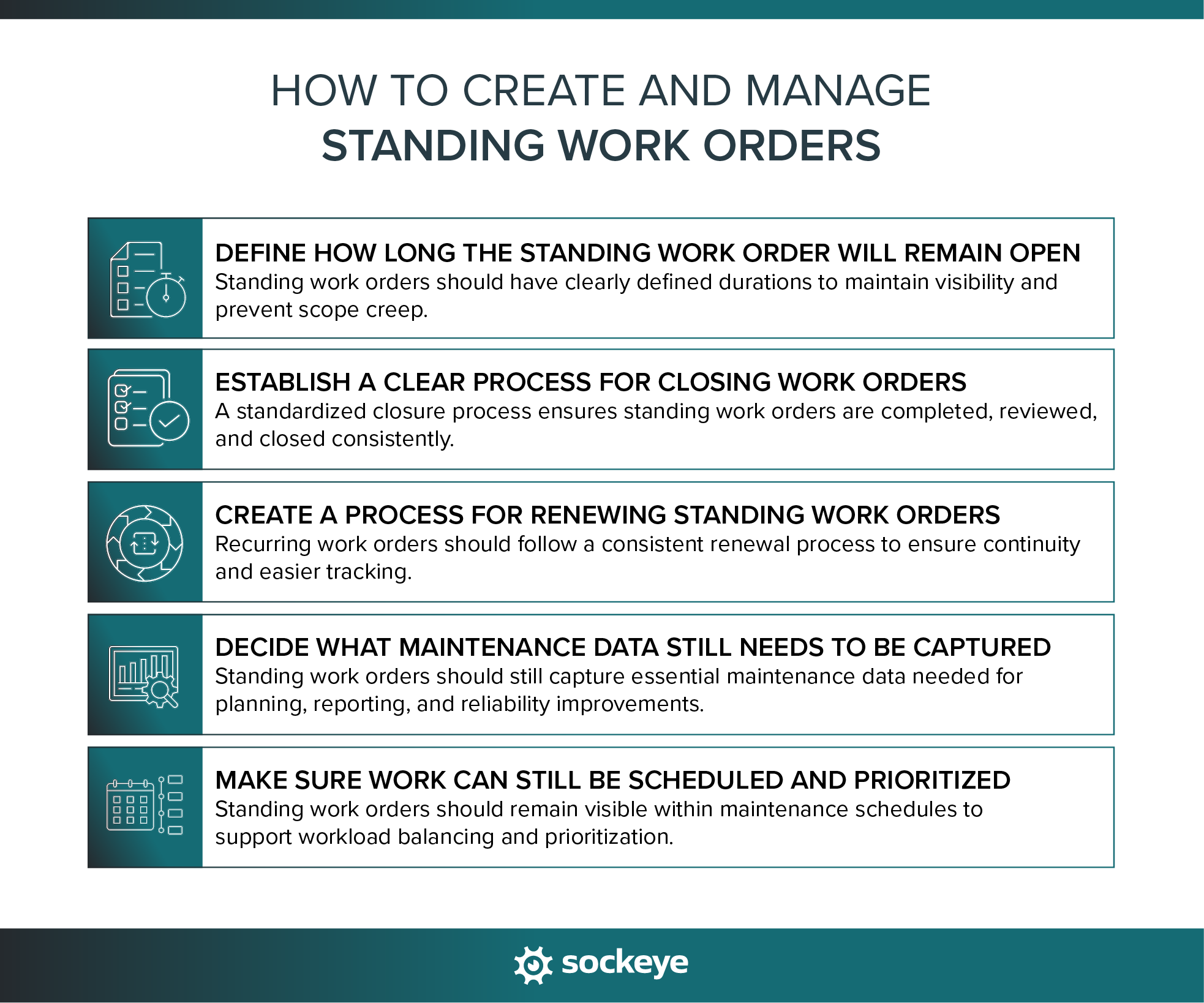
1. Define how long the standing work order will remain open
Every standing work order should have a clearly defined lifespan. Those that stay open for too long tend to become a “catch-all maintenance” bucket for miscellaneous work, which ruins visibility.
A good practice is to align the duration with the type of work being performed:
- Daily or weekly tasks may use monthly standing work orders.
- Seasonal activities like snow removal may stay open for an entire season.
- General facility maintenance may use quarterly work orders.
Also, keep the scope narrow and clearly defined.
Actionable tip: Set automatic review or expiration dates in your CMMS/EAM system so standing work orders are routinely evaluated and renewed when needed.
2. Establish a clear process for closing work orders
One of the most common problems with standing work orders is that nobody knows exactly when they should be closed. As a result, work orders stay open far longer than intended.
Teams should define:
- Who is responsible for closing the work order
- What information must be completed before closure
- Whether supervisor approval is required
- How is completed work reviewed.
Actionable tip: Don’t forget to assign ownership. For example, a facilities supervisor may own all standing work orders related to housekeeping and groundskeeping, while a maintenance planner oversees recurring equipment inspections.
3. Create a process for renewing standing work orders
There should be a simple and repeatable process for renewing or replacing standing work orders so recurring tasks continue without interruption. Some organizations automate this process directly inside their CMMS or EAM system by generating new standing work orders on a recurring schedule.
For example, housekeeping work orders may automatically renew on the first day of each month, while daily inspection WOs might be generated each Monday.
Actionable tip: Standardize naming conventions and scheduling rules so any recurring WOs are easy to identify, track, and report on.
4. Decide what maintenance data still needs to be captured
Even though standing work orders simplify administration, maintenance teams still need useful operational data. One major mistake organizations make is treating standing work orders like informal task lists with little documentation.
For each standing work order, determine what information technicians are expected to record, such as:
- Labor hours
- Materials and parts used
- Inspection findings
- Equipment condition notes
- Task completion status.
Depending on the tool you use to track maintenance work, you might need to implement workarounds — like using the notes section for everything. Ideally, the system will let you enter these details without needing to close the WO, while time-stamping each entry.
Actionable tip: Keep documentation requirements simple but consistent. Collect only the data that supports maintenance planning, reporting, compliance, or reliability improvement efforts.
5. Make sure work can still be scheduled and prioritized
Standing work orders should support maintenance scheduling, not bypass it entirely. Even recurring routine work still needs visibility within the maintenance schedule so teams can balance workloads and avoid resource conflicts.
For example, if multiple technicians are assigned recurring inspections under standing work orders, planners still need to understand:
- When the work is happening
- How much labor is required
- Whether production access is needed
- Which tasks are higher priority.
Without scheduling visibility, standing work orders will create hidden workloads that make planning more difficult.
Actionable tip: Use digital scheduling tools that help you visualize labor availability and utilization. Calculate how much labor and resources standing WOs require, and leave that buffer when creating the weekly maintenance schedule.
Simplify work order scheduling with Sockeye
Sockeye is a maintenance scheduling and reporting bolt-on that integrates directly with your existing CMMS or EAM system.
Instead of replacing your current maintenance software, it works alongside it to automate daily and weekly scheduling, visualize the schedule and labor utilization, track technician and contractor availability, and level workload between teams.
On top of all that, Sockeye comes with a built in metric to track how much time your team is spending on standing work orders. Here’s a quick video that explains how:
Last but not least, Sockeye is amazing at eliminating problems that stem from disconnected scheduling processes.
In many facilities, planners and schedulers still rely heavily on spreadsheets and manual updates to manage schedules. This makes it harder to keep standing work orders organized and properly prioritized. Sockeye centralizes scheduling information so teams can work from a single, verified, up-to-date schedule.
Want to learn more? 👉 See everything Sockeye can do!
