
PRONTO XI SCHEDULING BOLT-ON
Maintenance Scheduling & Reporting for Pronto Xi Teams
Sockeye is an easy-to-use scheduling tool that works with your Pronto Xi work orders. Your planner sees the ready work next to who is available and builds the weekly and daily schedule in one place, and the work orders stay in Pronto Xi.
Three ways to connect to Pronto Xi
File-based, read only or read/write. The free trial runs on a Pronto Xi export to Excel, so it needs no IT work, and you can move to read only or read/write once IT is ready.
“Scheduling used to take me hours to do for just one crew, and I planned schedules for six different crews. What used to take me up to five days of work can now be done with Sockeye in just under an hour.”
Todd Hicks, Planning and shutdown superintendent at the AV Group
A small scheduling solution For big maintenance teams
We built a scheduling bolt-on that takes about one hour to learn, and 98% of users stick with it long-term.





For mining fixed plant on Pronto Xi
Mining maintenance crews work to a roster and share the week with contractors. In Sockeye the planner enters each crew’s roster, including rotations on and off site, sees who is on site that week and builds the fixed plant schedule around them. The schedule is online, so a superintendent at head office sees the same week as the crew on site.
A multi-site gold miner in New Zealand, the US and the Philippines runs Sockeye with Pronto Xi.
Maintenance scheduling on Pronto Xi, with and without Sockeye
| Pronto Xi + Excel | Pronto Xi + Sockeye | |
|---|---|---|
| Building the schedule | Work orders exported from Pronto Xi and copied into a spreadsheet every week. | The planner picks ready work orders and assigns available people in one window, with the weekly and daily views side by side. |
| Changes during the week | An emergency or a sick call means editing the sheet and checking again who is free. | Drag the work to the next open slot. Sockeye shows when a crew is booked beyond its capacity. |
| Who can see it | Several versions of the schedule, and not everyone has access. | One live schedule, shared with whoever needs it, with status updates. |
| Labor availability | Rosters, leave and contractors kept in a separate sheet. | Crew and contractor availability from your shift patterns and planned absences. |
| Reporting | Schedule compliance and backlog pieced together from spreadsheets, if at all. | SMRP and custom KPI reports on schedule compliance, labor use and backlog. |
Take Sockeye for a test drive!
No IT involvement required.
Confirm user adoption and get a proof of concept before spending a single cent.
TAKE THE FREE TRIALWEEKLY & DAILY SCHEDULING
Consistent weekly & daily scheduling
Sockeye shows your ready-to-schedule Pronto Xi work orders next to the technicians and contractors available to do them. The planner picks the work, assigns the people and builds the weekly and daily schedules in one window.
A new user is trained in about an hour.


LABOR AVAILABILITY DASHBOARD
Do more work with fewer resources
With live labor availability in front of them, planners can level workloads between crews and fill each crew’s week close to capacity without piling on overtime.
“Sockeye identifies where deficiencies are in your man hours. For instance, if Crew A is 40 hours over schedule, but Crew B is only 35% scheduled, you can move your resources to level it out to avoid overtime pay. That saves you money.”
Todd Hicks, Planning and Shutdown Superintendent at the AV Group
TEAM-WIDE VISIBILITY
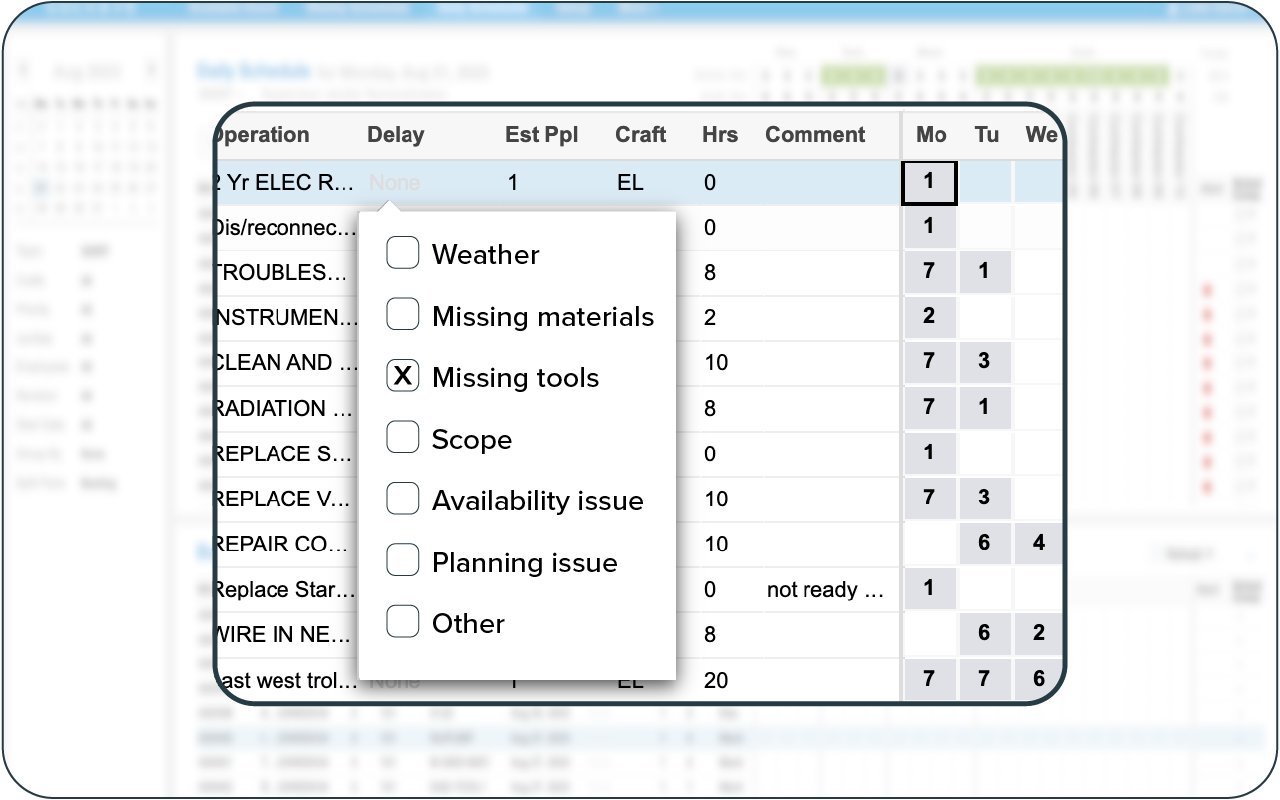
Visualize schedules & track delays
Share live schedules and give each person the access they need, so frontline teams stay aligned. Always know what’s done, what’s in progress, what’s due next week and why work gets missed.
An emergency or a sick call? The planner drags the work to the next open slot and everyone sees the change.
RELIABLE KPI REPORTING
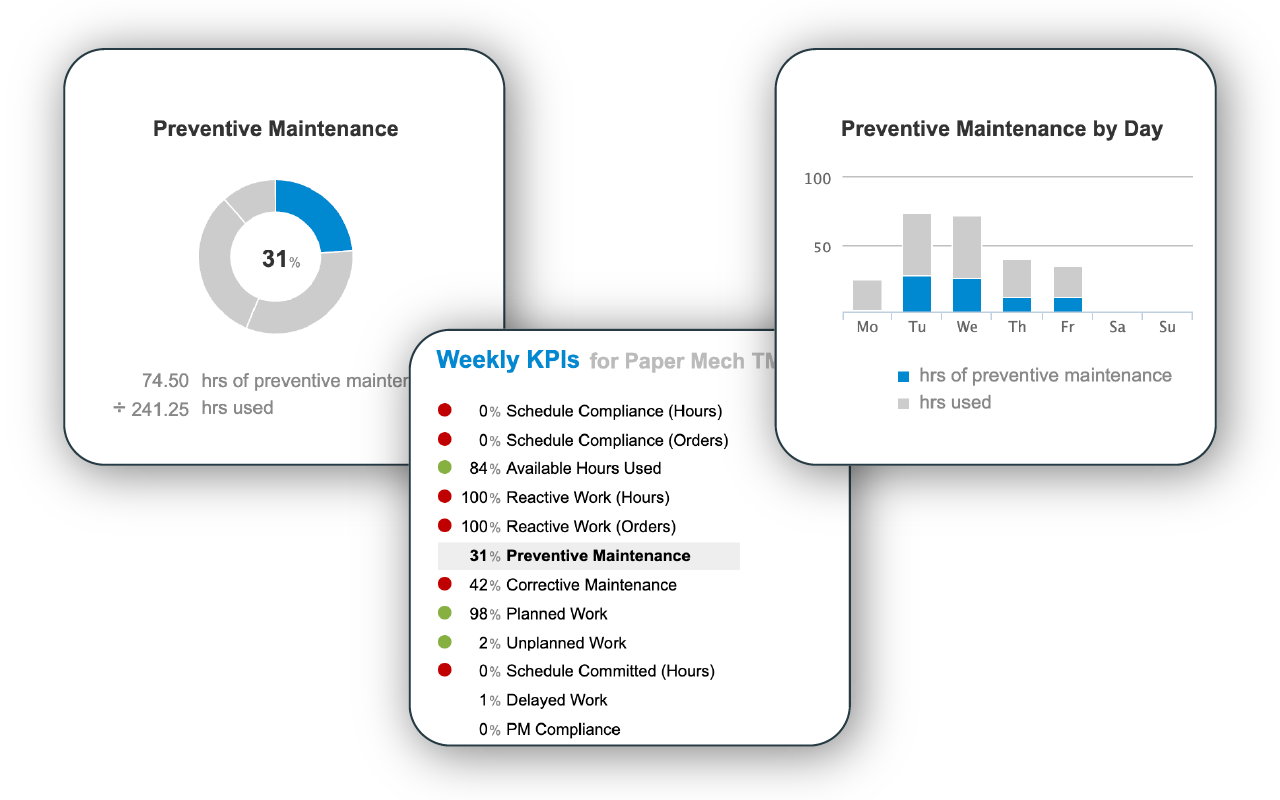
Keep tabs on metrics that matter
Get SMRP and custom KPI reports on schedule compliance, labor utilization, reactive vs preventive work and backlog trends, and send the data on to Microsoft Power BI or another reporting tool.
Track how specific work orders affect reliability to see how well your current maintenance schedule is working.
PRONTO XI SCHEDULING BOLT-ON
Close the gap between planning and scheduling
Tired of bouncing between Pronto Xi and spreadsheets while work keeps falling behind? Sockeye gives the planner one place to build the schedule, which frees up time for better job plans and task sequences.
BOOK A DEMO
Step 1
Get a Customized Demo
We start with a call from one of our product specialists to understand your specific needs. We then run a customized demo with your entire team so you can see how Sockeye makes scheduling easy.

Step 2
Start Your Risk-Free Trial
Test drive Sockeye using a file-based integration (Excel). This requires no investment or IT resources, just a couple of hours from your scheduler. Make sure Sockeye fits before you go all in.

Step 3
Get the Most out of Your Team
No more scattered schedules, missing data or flying blind. Build the daily and weekly schedules the same way every week, see the latest status and get more preventive work done.
Frequently Asked Questions
Sockeye offers three integration options for every CMMS, Pronto Xi included:
1. File-based
Export your Pronto Xi work orders into Sockeye’s Excel template and click ‘refresh’ to update your data. It needs no IT resources or custom coding, and it’s how the free trial runs.
2. Read only
Sockeye reads ready work orders and labor data from Pronto Xi. Nothing is written back to Pronto Xi.
3. Read/write
Sockeye reads from Pronto Xi and writes schedule updates back, so a change made in either system shows up in both.
Learn more about integration types
A full production rollout with API integration takes 4 to 6 weeks, while a file-based integration can be done in under 2 weeks.
Sockeye’s experts handle most of the integration work; your IT team just needs to provide access (API endpoints or database views) and some oversight. Sockeye is cloud-based, so there is no server to install or software to maintain on-premises.
Yes, Sockeye offers a one-month trial using our file-based integration. You’ll get access to all of Sockeye’s features and support throughout the trial. To get started, share an Excel file of your schedule and join a 1-hour training session.
The exact data exchanged typically includes work order details, scheduling fields, and resource info. Configurations can be customized as read-only or selective write-back to accommodate your IT/security policies.
Work orders are updated according to your requirements. With read/write integration, a typical setup updates a work order once its scheduled end date has passed, and changes made in Pronto Xi or Sockeye are synced to both systems. With file-based or read-only integration, nothing is written back to Pronto Xi.
Enter your technicians’ and contractors’ shift patterns in Sockeye, including rotating rosters and crews that work a stretch on site, then a stretch off. Leave, training and other absences take a couple of clicks to add.
Yes, Sockeye integration is customized to your scheduling and IT requirements: read/write, read only, write only specific fields and so on. Sockeye is designed to fit your company’s integration rules.
We take data security very seriously. Sockeye is hosted on Microsoft Azure, which has industry-standard certifications (like ISO and SOC 2). Data is always encrypted, and backups are stored in a separate geographic region.
On the access side, we support role-based user permissions, SSO (Single Sign-on), and 2FA (two-factor authentication).
From Fortune 100 enterprises to single-site enterprises, Sockeye is ready, vetted, and prepared for your IT security review.
Learn more about Sockeye’s security
Schedule more work.
Get more work done.
Let us help you create a highly productive maintenance team.
BOOK A DEMO